An LED display controller is the hardware that takes a video signal and distributes it, pixel by pixel, to the receiving cards inside each LED panel over Cat5e or Cat6 data cable. A full control system is the sending card or processor, the receiving cards and the software that configures them. Pixel capacity decides which model you need.
Updated November 2026. Guide first published September 2025.
You have chosen the pixel pitch and the screen size. The part that decides whether that screen performs is the controller: the hardware that turns a video signal into millions of correctly timed pixels. This guide explains each component, the specifications that separate one controller from another, how the main brands compare and how to match a controller to the job.
Key takeaways
- Every LED screen needs three things: a sending card or processor, a receiving card in each panel, and the configuration software that maps them.
- Synchronous controllers mirror a live source. Asynchronous players store and schedule content. Dual-mode units do both.
- Pixel capacity is the first number to check. A 4K canvas is 8.3 million pixels, and a 1G network port carries about 650,000 pixels at 60 Hz and 8-bit colour.
- Genlock, frame multiplication and shutter sync only matter when a camera is pointed at the screen.
- Controllers and receiving cards must come from the same ecosystem: a NovaStar processor needs NovaStar receiving cards in the panels.
Synchronous or asynchronous: the first controller decision
The first decision is how content reaches the screen. Synchronous systems mirror a live source. Asynchronous systems store content on the controller and play it to a schedule. The choice sets what the system can do in real time, and it is covered in more depth in our guide to synchronous and asynchronous LED control systems.
Synchronous controllers
A synchronous controller mirrors a source in real time. A computer, media server or camera feed goes in, and what appears on the source monitor appears on the LED screen at the same moment. Live events, broadcast, image magnification at conferences and interactive installations all need this, because any delay between the action and the screen is visible to the audience.
Asynchronous controllers
An asynchronous controller has its own storage and processing. You upload videos, images and text to it, and it plays them back to a schedule without a computer attached. It suits digital signage and retail displays where the content is planned in advance. Most asynchronous players are managed over the internet; our NovaStar cloud CMS and VNNOX guide covers that side.
Dual-mode controllers
Some controllers do both. NovaStar’s Taurus and KU series players run scheduled content from their own memory and can also take a live HDMI source, and the switch between the two can be made remotely from the CMS. They cover many signage and meeting-room jobs, though they lack much of the input, scaling and synchronisation capability of a full synchronous processor.
| Controller type | How content arrives | Latency | Typical use |
|---|---|---|---|
| Synchronous | Live from a computer, media server or camera | Low, usually a few frames or less | Live events, broadcast, conferences, interactive displays |
| Asynchronous | Uploaded to on-board storage and played to a schedule | Not relevant | Digital signage, retail, menu boards |
| Dual-mode | Scheduled playback with a live HDMI input that can take over | Low on the live input | Meeting rooms, showrooms, reception screens |

What is inside an LED display control system
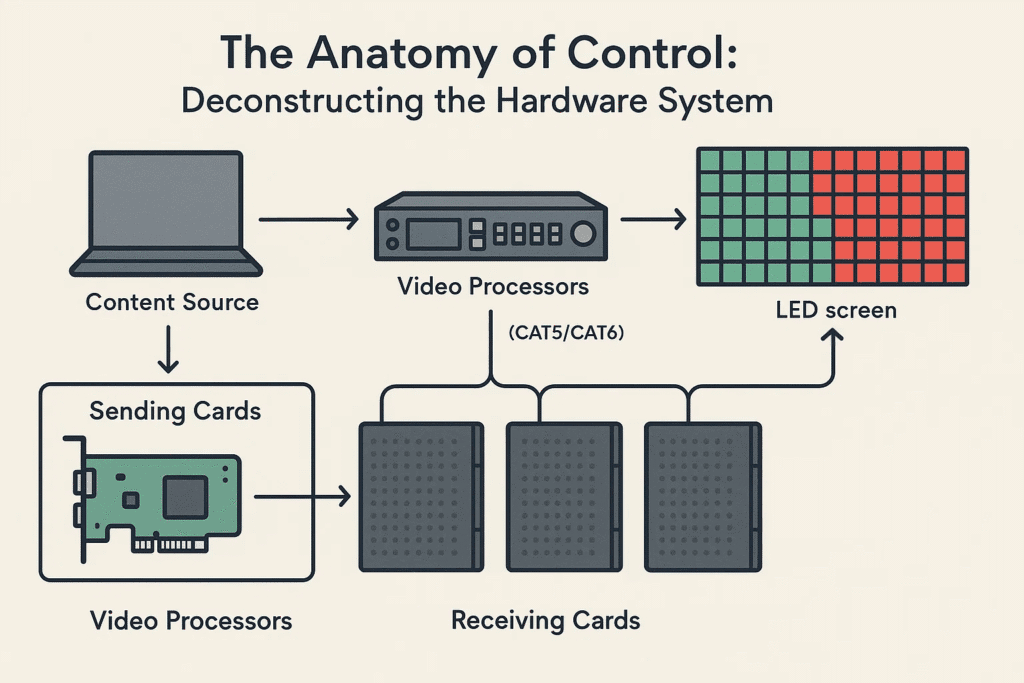
An LED display controller is not one box. It is a chain of components, and each one has to be sized and configured for the screen in front of it.
Sending cards
The sending card is the starting point. It sits in a control PC or inside a standalone processor and converts the video signal, from HDMI, DisplayPort or SDI, into the data format the LED panels understand, sent over standard Cat5e or Cat6 network cable. A high-capacity NovaStar sending card can drive millions of pixels. Sending cards rarely scale content themselves, so they are usually fed by a media server or software such as Resolume.
Receiving cards
Inside every LED cabinet or module is a receiving card. It takes the data from the sending card and passes it to the driver ICs, which set the colour and brightness of each LED. The number of receiving cards follows the size and resolution of the screen. Some fixed-install cabinet ranges Dynamo supplies are specified with receiving card dual backup, so one card failing does not black out the cabinet.
Video processors
A dedicated LED video processor combines the sending card with a scaler and switcher. It takes several inputs, scales them onto a canvas that is rarely a standard 16:9 resolution, and handles colour space conversion and HDR. For any large or multi-source LED video wall a processor is the practical choice rather than an optional extra.
Configuration software
Each ecosystem has its own software for mapping receiving cards to their position on the screen, setting brightness and loading calibration data. The map tells the controller which cabinet is where, so a cable plugged into the wrong port shows up as a misplaced block of picture rather than a dead one. Asynchronous players add a cloud CMS for scheduling content remotely.
How the signal travels from source to pixel
The chain is short. Content leaves the source, is processed, is distributed over network cable and is lit by the driver ICs behind each LED.
- The content source: a media server, PC, camera, set-top box or the player’s own storage.
- The processor or sending card scales the picture to the screen’s pixel canvas and converts it to LED data.
- Network or fibre outputs carry that data to the first cabinet in each chain, and it is passed cabinet to cabinet.
- The receiving card in each cabinet picks out its own section of the picture.
- The driver ICs set the brightness of every red, green and blue LED, thousands of times a second.
Controller specifications that matter
Specification sheets for display controllers are long. These are the figures with the most effect on what you see on the screen.
Pixel capacity
Pixel capacity, or loading capacity, is the total number of pixels a controller can drive. A 4K canvas of 3,840 × 2,160 is 8.3 million pixels, so it needs a controller rated above that, with spare capacity for future expansion. 4K-class processors such as the NovaStar MX40 Pro are rated at 9 million pixels, and the NovaStar LED processor sizing guide shows how the figures stack up.
The capacity also has to be split across the outputs. A 1G network port carries about 650,000 pixels at 60 Hz and 8-bit colour, and fewer at 10-bit or 12-bit, so a 9-million-pixel canvas needs 14 or more ports or a 5G or fibre output. The 360° LED room Dynamo built at BAT’s London headquarters is a 17,920 × 1,280 pixel canvas, a little under 23 million pixels, driven as one image by a NovaStar H series processor.

Frame rate and refresh rate
These are two different things. Refresh rate, typically 1,920 Hz to 7,680 Hz, is set by the LED driver ICs on the panel and decides how often each LED is redrawn, which is what stops flicker on camera. Frame rate, typically 50, 60, 120 or 240 Hz, is the rate of the video signal the controller can accept and output. Controllers that accept high frame rates and lock to the source matter for broadcast, film and XR work.
Bit depth
Bit depth sets how many colour steps the controller can send to each LED. Higher bit depth processing, with 16-bit and above now common in professional processors, gives smoother gradients and stops the banding visible in dark scenes on lower-grade systems. The panel’s driver ICs set their own greyscale depth, so the screen is only as good as the weaker of the two.
Inputs and outputs
Check that the controller has the inputs your sources use: HDMI 2.0 or 2.1, DisplayPort or 12G-SDI for broadcast, and enough network or fibre outputs to drive the whole screen without long daisy chains. Loop-through outputs on the inputs let one source feed several processors, and a preview output helps the operator see what is on the wall.
Genlock
Genlock locks the controller’s output timing to an external reference signal from a sync generator or a camera system. It keeps the screen and the camera in step so there is no tearing, rolling or mismatched frames when the screen is filmed. It is standard in broadcast studios, virtual production stages and any event that is being streamed.
HDR
HDR support means the controller can pass a wider contrast range and colour volume from source to screen. Processors declare support for HDR10, which uses the PQ curve, and for HLG; both are defined in ITU-R BT.2100. The panel still has to deliver the brightness and black level. The controller’s job is to keep the signal intact on the way.
Low latency
Latency is the delay between the signal entering the controller and the pixels changing. For scheduled signage it does not matter. For live music, esports, image magnification and interactive displays a delay of a few frames is visible and distracting, so processors for these jobs offer a low-latency mode, often at the cost of some scaling features.
Shutter sync and frame multiplication
On a film or XR stage the LED screen is a filmed object. Shutter sync aligns the panel refresh to the camera shutter so moiré and dark bands disappear; NovaStar calls this Shutter Fit and Brompton calls it ShutterSync. Frame multiplication repeats or alternates frames so high-speed cameras see a steady image. The Brompton Tessera SX40 page describes both.
Colour management and 3D LUTs
Professional processors carry colour management tools and 3D LUT (look-up table) support. A LUT maps the colour of every incoming pixel to a corrected value, so the LED wall can be matched to a broadcast or cinema standard or to a reference monitor in the grading suite, and walls built from different panel batches can be matched to each other.
Mapping and irregular screens
Curved walls, columns, spheres and tickers are not rectangles, and the controller has to map a rectangular video frame onto them. Dynamo’s trading-floor LED ticker for PIMCO at 25 Baker Street is 17,920 × 128 pixels along a 35 m ceiling line, a shape no video output produces natively. Irregular screen support and the quality of the mapping tools decide how hard that set-up is.
NovaStar, Brompton and Colorlight compared
One industry forecast puts the global display controller market at USD 35.6 billion in 2025, rising to USD 81.9 billion by 2035. In LED, three names account for most professional installations, with a handful of smaller brands in signage. The table below collects the published figures for the current ranges; where a vendor does not document a feature the cell says so.
| Brand | Model / Series | Total Load (pixels) | Inputs | Outputs | Genlock | HDR | HFR / Frame Multiplication | Shutter Feature | Notes |
|---|---|---|---|---|---|---|---|---|---|
| NovaStar | H2, H-Series (Modular Splicer) | LED 4K card: 26,000,000; 4-Port fibre: 41,600,000 | Modular, up to 4 input cards; options include 4× DVI, 4× VGA, 4× HDBaseT, 2× DP 1.1, 1× DP 1.2, 4× 3G-SDI, 1× 12G-SDI, 2× RJ45 IP, 2× fibre, 1× ST 2110, 1× NDI, 2× audio-in + 2× audio-out; (HDMI 2.0 and HDMI 2.0+DP 1.2 cards are H15/H15 Enhanced only) | Modular, up to 2 output cards; options include 16× RJ45 + 2× fibre sending, 20× RJ45 sending, 2× RJ45 + 1× HDMI 1.3 preview, 4× DVI, 4× HDMI, 4× HDBaseT, 4× 3G-SDI, 1× HDMI 2.0, 4× fibre sending, 1× 12G-SDI | Card-dependent | HDR10; HLG (requires A-series receivers e.g., A8s/A10s) | Not stated | Not stated | Max Layers (2K): 32; Irregular screen config: Yes; Presets: 2000; Single-card layers: 16. |
| NovaStar | H5, H-Series (Modular Splicer) | LED 4K card: 39,000,000; 4-Port fibre: 62,400,000 | Modular, up to 10 input cards; same card options as above | Modular, up to 3 output cards; same output options as above | Card-dependent | HDR10; HLG (requires A-series receivers e.g., A8s/A10s) | Not stated | Not stated | Max Layers (2K): 48; Irregular screen config: Yes; Presets: 2000; Redundant power: Yes; Single-card layers: 16. |
| NovaStar | H9, H-Series (Modular Splicer) | LED 4K card: 65,000,000; 4-Port fibre: 104,000,000 | Modular, up to 15 input cards; same card options as above | Modular, up to 5 output cards; same output options as above | Card-dependent | HDR10; HLG (requires A-series receivers e.g., A8s/A10s) | Not stated | Not stated | Max Layers (2K): 80/160; Irregular screen config: Yes; Presets: 2000; Redundant power: Yes; Single-card layers: 16. |
| NovaStar | H15, H-Series (Modular Splicer) | LED 4K card: 130,000,000; 4-Port fibre: 208,000,000 | Modular, up to 30 input cards; adds optional 2× HDMI 2.0 card and 2× HDMI 2.0 + 2× DP 1.2 card (H15/H15 Enhanced only); plus the full card set above | Modular, up to 10 output cards; full output-card set supported | Card-dependent | HDR10; HLG (requires A-series receivers e.g., A8s/A10s) | Not stated | Not stated | Max Layers (2K): 160; Irregular screen config: Yes; Presets: 2000; Redundant power: Yes; Single-card layers: 16. |
| NovaStar | H15 Enhanced, H-Series (Modular Splicer) | LED 4K card: 208,000,000; 4-Port fibre: 332,800,000 | Modular, up to 30 input cards; includes H15-only HDMI 2.0 / HDMI 2.0+DP 1.2 options; plus the full card set | Modular, up to 16 output cards; full output-card set supported | Card-dependent | HDR10; HLG (requires A-series receivers e.g., A8s/A10s) | Not stated | Not stated | Max Layers (2K): 160; Irregular screen config: Yes; Presets: 2000; Redundant power: Yes; Single-card layers: 10 (Enhanced). |
| NovaStar | H20, H-Series (Modular Splicer) | LED 4K card: 260,000,000; 4-Port fibre: 416,000,000 | Modular, up to 40 input cards; full card set supported | Modular, up to 20 output cards; full output-card set supported | Card-dependent | HDR10; HLG (requires A-series receivers e.g., A8s/A10s) | Not stated | Not stated | Max Layers (2K): 320; Irregular screen config: Yes; Presets: 2000; Redundant power: Yes; Single-card layers: 16. |
| NovaStar | MX40 Pro, COEX 1G | 9,000,000 | 3× HDMI 2.0 (IN+LOOP); 1× DP 1.2; 1× 12G‑SDI (IN+LOOP) | 20× 1GbE; 4× 10G OPT; S/PDIF | Yes (IN+LOOP) | SDR; HDR10 (ST2084/ST2086); HLG | Up to 120/144/240 Hz; Frame Multiplication | Shutter Fit (requires A10s Pro) | Per-port @60 Hz: 8‑bit 659,722 px; 10‑bit 494,792 px; 12‑bit 329,861 px |
| NovaStar | MX30, COEX 1G | 6,500,000 | 1× HDMI 2.0 (IN+LOOP); 1× HDMI 1.4 (IN+LOOP); 1× DP 1.1; 2× 3G‑SDI (IN+LOOP) | 10× 1GbE; 2× 10G OPT; S/PDIF | Yes (IN+LOOP) | SDR; HDR10 (ST2084/ST2086); HLG | Up to 120/144/240 Hz | Shutter Fit | Per-port @60 Hz: 8‑bit 659,722 px; 10/12‑bit 329,861 px |
| NovaStar | MX20, COEX 1G | 3,900,000 | 2× HDMI 1.3 (IN+LOOP); 1× 3G‑SDI (IN+LOOP) | 6× 1GbE; 2× 10G OPT | Yes | SDR; HDR10 (ST2084/ST2086); HLG | Up to 120/144/240 Hz | Not stated | Max input 1920×1200@60 |
| NovaStar | KU20, COEX 1G (entry) | 3,900,000 | 1× HDMI 1.3 (IN+LOOP) | 6× 1GbE; 1× 10G OPT | No | SDR | Up to 120 Hz | No | Genlock not supported (“Except Genlock”) |
| NovaStar | CX80 Pro, COEX 5G | 35,389,440 | Card 1: 4× HDMI 2.0 + 4× 12G‑SDI; Card 2: 1× HDMI 2.1 + 1× DP 1.4 + 4× 12G‑SDI | 16× 5GbE; 2× 40G QSFP+; S/PDIF | Yes (IN+LOOP) | SDR; HDR10 (ST2084/ST2086); HLG | Up to 120/144/240 Hz; Frame Multiplication | Shutter Fit | Per-port @60 Hz: 8‑bit 2,592,000 px; 10‑bit 2,073,000 px; 12‑bit 1,728,000 px |
| NovaStar | CX40 Pro, COEX 5G | 9,000,000 | 2× HDMI 2.0 (IN+LOOP); 1× DP 1.2; 2× 12G‑SDI (IN+LOOP) | 6× 5GbE; 1× 40G QSFP+; S/PDIF | Yes (IN+LOOP) | SDR; HDR10 (ST2084/ST2086); HLG | Up to 120/144/240 Hz; Frame Multiplication | Shutter Fit | Per-port @60 Hz: 8‑bit 2,592,000 px; 10‑bit 2,073,000 px; 12‑bit 1,728,000 px |
| NovaStar | VX400, VX (All‑in‑one) | 2,600,000 | HDMI 1.3×2; DVI×1; 3G‑SDI×1 | 4× 1GbE; 1× 10G OPT | Not stated | Not stated | Not stated | No | DVI/SDI loops; HDMI monitor out |
| NovaStar | VX600, VX (All‑in‑one) | 3,900,000 | HDMI 1.3×2; DVI×1; 3G‑SDI×1 | 6× 1GbE; 1× 10G OPT | Not stated | Not stated | Not stated | No | DVI/SDI loops; HDMI monitor out |
| NovaStar | VX1000, VX (All‑in‑one) | 6,500,000 | HDMI 1.4×2; DVI×2; 3G‑SDI×1 | 10× 1GbE; 1× 10G OPT | Not stated | Not stated | Not stated | No | DVI/SDI loops; HDMI monitor out |
| NovaStar | NovaPro UHD Jr, All‑in‑one 4K | 10,400,000 | HDMI 2.0×1; DP 1.2×1; 12G‑SDI×2; DVI×4 | 16× 1GbE; 4× 10G fibre | Not stated | Not stated | Not stated | No | High I/O density inc. 4× 10G fibre; Input depth up to 12‑bit (vendor table) |
| NovaStar | MCTRL 4K, Independent Controller | 8,800,000 | DP 1.2×1; HDMI 2.0×1; Dual DVI×2 | 16× 1GbE; 4× 10G fibre | Yes (offset adjustable) | Not stated | Not stated | No | Low latency; rotation |
| NovaStar | MCTRL R5, Independent Controller | 4,140,000 | 6G‑SDI×1; HDMI 1.4×1; Dual DVI×2 | 16× 1GbE; 2× 10G fibre | Not stated | Not stated | Not stated | No | Low latency; rotation |
| NovaStar | MCTRL 660 Pro, Independent Controller | 2,300,000 | DVI IN+LOOP; HDMI IN+LOOP; 3G‑SDI IN+LOOP | 6× 1GbE; 2× 10G fibre | Not stated | Not stated | Not stated | No | Includes loops and monitoring |
| NovaStar | TU40 Pro, Playback Control Processor | 13,000,000 | HDMI 1.3×1; HDMI 2.0×2; USB 2.0×2; USB 3.0×1 | 20× 1GbE; 2× 10G OPT; HDMI 1.3 (monitor); S/PDIF; 3.5mm; eARC | No | HDR decoding (H.265/H.264 up to 4K@60) | Not stated | No | Android 13; wireless mirroring; output scaling |
| Brompton | Tessera SQ200, Tessera Gen‑3 (100G AVoIP) | 9,000,000 / 18,000,000 / 27,000,000 / 36,000,000 (licensed tiers) | AVoIP: 2× 100G QSFP28 (ST 2110 / IPMX, ST 2022-7); Baseband (up to 4 cards): each card has 1× 12G-SDI, 1× HDMI 2.1, 1× DP 2.1 (one active per card) | 2× 100G QSFP28 to distribution (QD-S / XD-S); backwards-compatible with XD10G | Yes (Bi/Tri-level; PTP; lock to source) | SDR; PQ (ST-2084); HLG | Up to 250 fps; Frame Rate Multiplication (x2–x10) per Tessera software; capacity reduces at higher fps | Not explicitly documented for SQ200 in public release notes; on-camera features via licensed bundles | Up to 64K wide/tall canvas; closed-loop & processor redundancy; tiered licensing |
| Brompton | Tessera SX40, Tessera 4K (10G to XD) | 9,000,000 | 1× HDMI 2.0 (IN+THRU); 1× 12G-SDI (IN+THRU) | 4× 10GbE trunks (copper or fibre) to XD fan-out | Yes (Bi/Tri-level IN+THRU; lock to source) | SDR; PQ (ST-2084); HLG | Up to 250 fps; Frame Rate Multiplication (x2–x10) | ShutterSync | Each 10G trunk fans out to up to ten 1GbE via XD; Ultra-Low Latency available |
| Brompton | Tessera S8, Tessera 4K (mid-range) | 4,500,000 | 1× HDMI 2.0 (IN+THRU); 1× 12G-SDI (IN+THRU) | 8× 1GbE | Yes (Bi/Tri-level IN+THRU; lock to source) | SDR; PQ (ST-2084); HLG | Up to 250 fps; Frame Rate Multiplication (x2–x10) | ShutterSync | Per-port @60 Hz (nominal): 8-bit 525,000 px (10-bit/12-bit reduced); closed-loop redundancy supported |
| Brompton | Tessera S4, Tessera HD | 2,100,000 | 1× DVI-D (IN+THRU) | 4× 1GbE | Source-lock (no external ref input) | Not stated | Standard 60 Hz; Frame Rate Multiplication within 60 Hz cap | No | Per-port @60 Hz (nominal): 8-bit 525,000 px |
| Brompton | Tessera M2, Tessera HD (legacy) | 2,100,000 | 1× DVI-I (IN+THRU); 2× 3G-SDI (IN+THRU) | 4× 1GbE | Yes (Bi/Tri-level IN+THRU; lock to source) | Not stated | Standard 60 Hz; Frame Rate Multiplication within 60 Hz cap | No | Low-latency mode; per-port @60 Hz: 8-bit 525,000 px |
| Brompton | Tessera T1, Tessera HD (entry) | 525,000 | 1× DVI-D (IN+THRU) | 1× 1GbE | Source-lock | Not stated | Standard 60 Hz; Frame Rate Multiplication within 60 Hz cap | No | Nominal 525,000 px @60 Hz, 8-bit; low-latency mode available |
| Colorlight | Z8, Super Processor (Z-series) | 47,180,000 | Swappable boards (up to 6): 2× HDMI 2.0; 2× DP 1.2; 2× 12G-SDI; 3-in-1 (HDMI 2.1 + DP 1.4 + 12G-SDI, all w/ loop); ST 2110 (uncompressed 4K) | Modular (up to 4 boards): 4× 5GbE; 2× 10G fibre; 4× 10G fibre (2 main + 2 backup); 4× 5G fibre | Yes (BNC IN + LOOP; Bi-level/Tri-level) | HDR10; HLG | Input 23.98–240 Hz; Frame Multiplication up to ×10 | ShutterLock (with compatible receiving cards) | Per 4×10G board @60 Hz 8-bit: 13.10M px; per 4×5G board @60 Hz 8-bit: 11.79M px. |
| Colorlight | Z6 PRO-G2, Super Processor (Z-series) | 13,100,000 | Four 4K input cards (HDMI 2.0 / DP 1.2 / 12G-SDI), up to 4096×2160@60 per card | 4× 10G fibre (2 main + 2 backup) | Yes (IN + LOOP) | HDR10; HLG | Up to 240 Hz; Frame Multiplication up to ×6 | Not stated | Low-latency; multi-window; 3D-LUT/Colour Magic/Colour Curve. |
| Colorlight | Z5 / Z4 Pro, Super Processor (Z-series) | Up to 13,000,000 (model-dependent) | Full 4K inputs: HDMI 2.0 + DP 1.2 + 12G-SDI | 20× 1GbE; optical transmission supported | Yes (IN + LOOP) | HDR10; HLG | Not documented | Not documented | “Up to 13M px” across Z5/Z4 Pro page; some sheets list Z4 Pro ≈6.55M, confirm variant. |
| Colorlight | Z4F, Super Processor (Z-series) | 8,300,000 | 1× HDMI 2.0 / DP 1.2; 4× DVI; 2× 3G-SDI | 2× fibre; 4× 1GbE; HDMI monitor out | Yes (IN + LOOP) | HDR10 | Not documented | Not documented | Genlock & HDR noted on family page. |
| Colorlight | Z3, Super Processor (Z-series) | 8,840,000 | Full 4K inputs: HDMI 2.0; DP 1.2; 12G-SDI | 6× 5GbE or 3× 10G fibre | Yes | HDR10; HLG | Up to 240 Hz | Not documented | Designed for low latency; 5G transmission; 16,384-wide max. |
| Colorlight | X40m, Professional Processor (X-series) | 26,210,000 | 1× HDMI 2.0; 1× DP 1.2; 2× HDMI 1.4; 2× DVI | 40× 1GbE or 4× 10G fibre | Yes (lock to input; external ref not explicit) | Not documented | Not documented | Not documented | 6-layer free splicing; USB playback; scene presets. |
| Colorlight | X26m, Professional Processor (X-series) | 17,030,000 | 1× DP 1.2; 1× HDMI 2.0; 2× HDMI 1.4; 2× DVI | 26× 1GbE or 3× 10G fibre | Not documented | Not documented | Not documented | Not documented | Dual-4K inputs; per-port backup options vary by mode. |
| Colorlight | X20, Professional Processor (X-series) | 13,000,000 | 1× HDMI 2.0; 1× DP 1.2; 2× HDMI 1.4; 2× DVI | 20× 1GbE; 2× 10G fibre | Yes (locks to active input/internal V-sync) | Not documented | Input frame rates up to 144 Hz | Not documented | Max 16,384×8,192; Genlock to input/internal. |
| Colorlight | X16, Professional Processor (X-series) | 8,880,000 | 1× HDMI 2.0; 4× DVI; 2× 3G-SDI | 16× 1GbE | Yes (IN + LOOP) | Not documented | Not documented | Not documented | Genlock BNC In/Loop; max width/height 8192 px. |
| Colorlight | X12, Professional Processor (X-series) | 7,800,000 | 1× DVI; 3× HDMI 1.4 | 12× 1GbE | Not documented | Not documented | Not documented | Not documented | Max 8192×4096; 3-window display; per-port ≈0.65M px. |
| Colorlight | X8, Professional Processor (X-series) | 5,000,000 | 4× DVI; 2× SDI | 8× 1GbE | Yes (IN + LOOP) | Not documented | Not documented | Not documented | Five-layer display; 8192 max width/height. |
| Colorlight | X4, Professional Processor (X-series) | 2,300,000 | SDI×1; HDMI×1; DVI×1; VGA×1; CVBS×1 | 4× 1GbE | No (not listed) | Not stated | Not stated | No | Classic 1U controller; 1920×1200 max input. |
| Colorlight | X1, Professional Processor (X-series) | 1,310,000 | HDMI×1; DVI×2 | 2× 1GbE | No (not listed) | Not stated | Not stated | No | Max width/height 4096/2560; dual USB for cascading. |
| Colorlight | VX20, VX (All-in-one) | 13,100,000 | HDMI 2.0; DP 1.2; 12G-SDI; HDMI 1.4; DVI | 1GbE + 10G fibre (20× RJ45 / 2× 10G typical) | Not documented | Not documented | Not documented | No | Processor / fibre transceiver / bypass modes. |
| Colorlight | VX10, VX (All-in-one) | 6,550,000 | HDMI 2.0; DP; HDMI 1.4; DVI; 3G-SDI | 10× 1GbE; 2× 10G fibre; HDMI 1.3 monitor out | Not documented | HDR (family page) | Up to 240 Hz (family docs) | No | Some sheets say 3.93M vs 6.55M, confirm variant. |
| Colorlight | VX6, VX (All-in-one) | 3,930,000 | DP 1.4; HDMI 2.0; HDMI 1.4×2; DVI×2 | 6× 1GbE; 2× 10G fibre; HDMI 1.3 monitor out | Not documented | HDR (family page) | Up to 240 Hz (family docs) | No | Per-port ~650k px @60 Hz. |
NovaStar
NovaStar is the most widely used ecosystem across rental and fixed installation. The range runs from simple asynchronous players to the all-in-one NovaStar processors used on touring and large-scale events, and the modular H series frames for very large canvases. The TU series covers interactive and meeting-room work, while the COEX series competes with Brompton on virtual production and filming.

Brompton Technology
Brompton’s Tessera processors are the standard in high-end virtual production, film and broadcast. Processors from the Tessera T1 upwards are known for colour accuracy, on-screen colour adjustment and features built for on-camera work, and the Tessera S8 datasheet sets out the low-latency scaling on the 4K models. Brompton processors need Brompton receiving cards in the panels.
Colorlight
Colorlight controllers are increasingly available in the UK and are most often seen on budget and mid-range installations. The Z series processors now list genlock, HDR and frame multiplication. For broadcast and XR projects most integrators still specify Brompton or NovaStar for their camera synchronisation features and support infrastructure, and suitability depends on the project.
Linsn
Linsn is one of the longer-established names in LED control but has not moved far on receiving cards or controllers in recent years. The company has branched into LED panels and is now rarely seen outside markets in the Far East.
Dbstar and Lumen
Dbstar is mostly used for asynchronous LED signs and digital signage, and offers more than its market position suggests, including 16-bit video source handling and greyscale adjustment. Lumen controllers are also aimed at LED signage rather than synchronous video walls; for a budget, intuitive system they are a sound option.
How Dynamo specifies and supports LED control systems
Dynamo works in both main ecosystems and supplies the controller with the panels, so one supplier is responsible for the whole chain. Our LED display products and control systems range covers fixed-install cabinets, rental cabinets and the processors that drive them. Specifying the controller starts with the pixel count, then the sources, then whether a camera will ever be pointed at the screen.
The BAT room is the clearest example. 350 DRE Series P1.93 cabinets, 70 wide and 5 high, form a 17,920 × 1,280 pixel canvas that wraps the whole room. A NovaStar H5 series processor takes in Apple TV and content media players and drives the full canvas as one image. For the PIMCO ticker, the controller and the media player sit in the comms room, so nothing that processes content is above the trading floor.
Shaped displays need the same care. Curved DRA Series installations, flexible LED panels and LED video strips rely on the controller’s mapping tools to put a rectangular frame onto a surface that is not one, and we commission that mapping before hand-over. After hand-over, the support call for the screen and the controller comes to the same desk.
Choosing the right LED display controller for your application
The right controller is the one that fits the job. Match the application to the type first, then check the specification figures above.
| Application | Controller type | Features to check |
|---|---|---|
| Retail and digital signage | Asynchronous player | Storage, scheduling, cloud CMS, remote brightness control |
| Corporate reception or meeting-room LED wall | All-in-one controller or dual-mode player | Pixel capacity for the wall, HDMI inputs, simple preset switching |
| Trading floor or news ticker | Synchronous controller fed by a media player | Irregular mapping for long thin canvases, reliability, remote monitoring |
| Live events and screen hire | 4K-class processor | Multiple inputs, loop-through, genlock, layers and presets, redundancy |
| Broadcast studio and virtual production | Camera-grade processor | Genlock, shutter sync, frame multiplication, HDR, low latency, 3D LUTs |
| Curved, sphere or shaped displays | Processor with irregular screen support | Mapping tools, receiving card compatibility with the panel |
Whatever the application, pick a controller with spare pixel capacity, confirm the receiving cards in the panels match the controller’s ecosystem, and make sure the operator will have a preview output and software they can use under pressure.
LED display controllers: frequently asked questions
What does an LED display controller do?
An LED display controller takes a video signal from a computer, media player or camera and converts it into the data each LED panel needs, sent over network cable to the receiving cards in the panels. The receiving cards pass it to the driver ICs, which set the brightness and colour of every LED. The controller also holds the map of where each panel sits on the screen.
What is the difference between an LED controller and a video wall controller?
A video wall controller usually means the box that splits one picture across several LCD monitors, each with its own scaler. An LED controller drives the pixels directly through receiving cards, so the LED wall behaves as one display with one native resolution. Many LED processors also do the splitting and windowing job, so one unit can take several sources and lay them out across the wall.
Can I use any brand of controller with any LED panel?
No. Controllers and receiving cards are matched pairs within one ecosystem. A NovaStar processor needs NovaStar receiving cards in the panels, and a Brompton processor needs Brompton cards. Panels can sometimes be re-carded to change ecosystem, but it is a workshop job. Confirm compatibility between the chosen panels and controller before you buy either.
Do I need a separate video processor?
If you are showing one source on a standard 16:9 screen, an all-in-one controller is enough. For several sources, a non-standard resolution, picture-in-picture layouts or professional scaling and colour adjustment, a dedicated video processor or a media server with a sending card is the right tool. Most event and broadcast screens use a processor.
How many pixels can one LED controller drive?
It varies by class. Entry-level 1G controllers drive about 2 to 4 million pixels, 4K-class processors 8 to 13 million, and modular frames such as the NovaStar H series run from tens of millions to several hundred million pixels with the right cards. Each 1G output port carries about 650,000 pixels at 60 Hz and 8-bit colour, and fewer at higher bit depths.
How does latency affect an LED display?
For scheduled digital signage, latency does not matter. For synchronous uses such as live broadcast, conferences and image magnification, the delay between input and screen must be very low. A lag of even a few frames is visible against the live action, so processors for these jobs offer a low-latency mode, sometimes at the expense of scaling features.
Can one controller drive several screens?
Yes, as long as the total pixel count fits the controller’s capacity and each screen is mapped as its own area of the canvas. A multi-output processor can send different content to each screen, or the same picture to all of them. Separate asynchronous players per screen are often simpler for signage spread across a building.
Can I upgrade my controller later?
Yes. Control systems are modular, so a sending card or processor can be swapped for one with more pixel capacity or extra features without replacing the LED panels, as long as it stays within the same ecosystem as the receiving cards. Firmware updates also add features to existing processors over time.
Get a quote for an LED display control system
Tell us the screen size, pixel pitch, the sources you want to show and whether the screen will be filmed, and we will size the processor, confirm receiving card compatibility and send a written quote for the screen and controller together. Get a quote or call 020 3489 9878.