A NovaStar LED processor is the unit that turns a video signal into panel data. Size it by total pixel load (width × height in pixels), the number of sources and whether you need genlock: Taurus for signage playback, MCTRL for simple sending, VX for scaling, H-Series for large multi-source walls and Coex MX for broadcast and XR.
Every LED wall needs a processor. Choose the wrong one and you overspend on capacity you will never use — or discover on install day that the unit cannot drive the full screen. This guide covers the complete NovaStar LED processor range, from cloud-managed multimedia players to 520-million-pixel modular chassis, and gives you a practical framework for picking the right unit. Whether you are an AV integrator, a production company or a digital signage manager, this is the reference you need.
Updated September 2026. NovaStar’s LED processor range is reviewed by us annually; spec figures are sourced from NovaStar’s published datasheets at the time of writing.
Why this guide: Dynamo LED Displays is a UK specialist that designs, supplies and installs LED display systems across corporate, broadcast, retail and live-event sectors. We spec NovaStar processors on real client projects every week. This guide reflects how we actually choose processors in the field — not a product brochure.
Key Takeaways
- NovaStar’s product range splits into seven families — Taurus TB (multimedia players), Taurus TU (smart multimedia players), MCTRL (sending boxes), VX (all-in-one controllers), H-Series (modular chassis), Coex CX (next-generation all-in-one), and Coex MX (broadcast/XR) — each purpose-built for different project scales and use cases. For background on pitch and visual density, see our explainer on whether a lower pixel pitch is always better.
- The single most important sizing number is total pixel load: screen width × height in pixels at your chosen pitch.
- For content-driven signage with no live video source, Taurus TB multimedia players handle playback and sending in one box — managed remotely via NovaStar’s VNNOX cloud platform.
- When you need wireless projection, AirPlay, or native app playback (Teams, YouTube) in a boardroom or hospitality setting, the Taurus TU series bridges the gap between multimedia player and full processor.
- VX series suits roughly 80% of corporate, architectural and rental projects — pick the smallest model whose pixel capacity covers your wall.
- H-Series is the right call when you need many simultaneous signal sources (control rooms) or your wall exceeds 13 million pixels.
- For broadcast and virtual production, genlock and zero-frame latency matter more than raw pixel count — that is Coex MX territory.
- Never spec dual processors where a single larger unit would work — it adds failure points and complicates configuration.
- If the spec sheet feels overwhelming, our NovaStar LED processor calculator walks through the sizing sums step by step.
What Does an LED Processor Actually Do?
An LED processor takes a video signal — HDMI, DisplayPort, SDI — and converts it into the data format that LED receiving cards can understand, then distributes that data across Ethernet outputs to every panel in the wall. Without it, your LED panels have nothing to display.
Quick Definitions
- Processor / controller: scales, maps and distributes the video signal to the LED wall. Terms used interchangeably.
- Sending card / sending box: passes a signal to the panels without scaling. NovaStar’s MCTRL range.
- Multimedia player: stores and plays back content internally, doubling as a sender. NovaStar’s Taurus TB and TU families.
- Receiving card: the board inside each LED cabinet that receives data from the processor and drives the LEDs.
- Genlock: timing reference input that locks output to an external clock — essential when the wall appears on camera.
- Pixel load: total pixels your wall contains (width × height in pixels). Every processor has a maximum.
- Ethernet port capacity: each GbE output drives approximately 650,000 pixels at 60 Hz.
- Synchronous vs asynchronous: synchronous = live video in real time; asynchronous = stored content playback, no live source.
For a deeper look at LED signal chains, see our LED display controller hardware explainer.
The LED Signal Chain in 30 Seconds
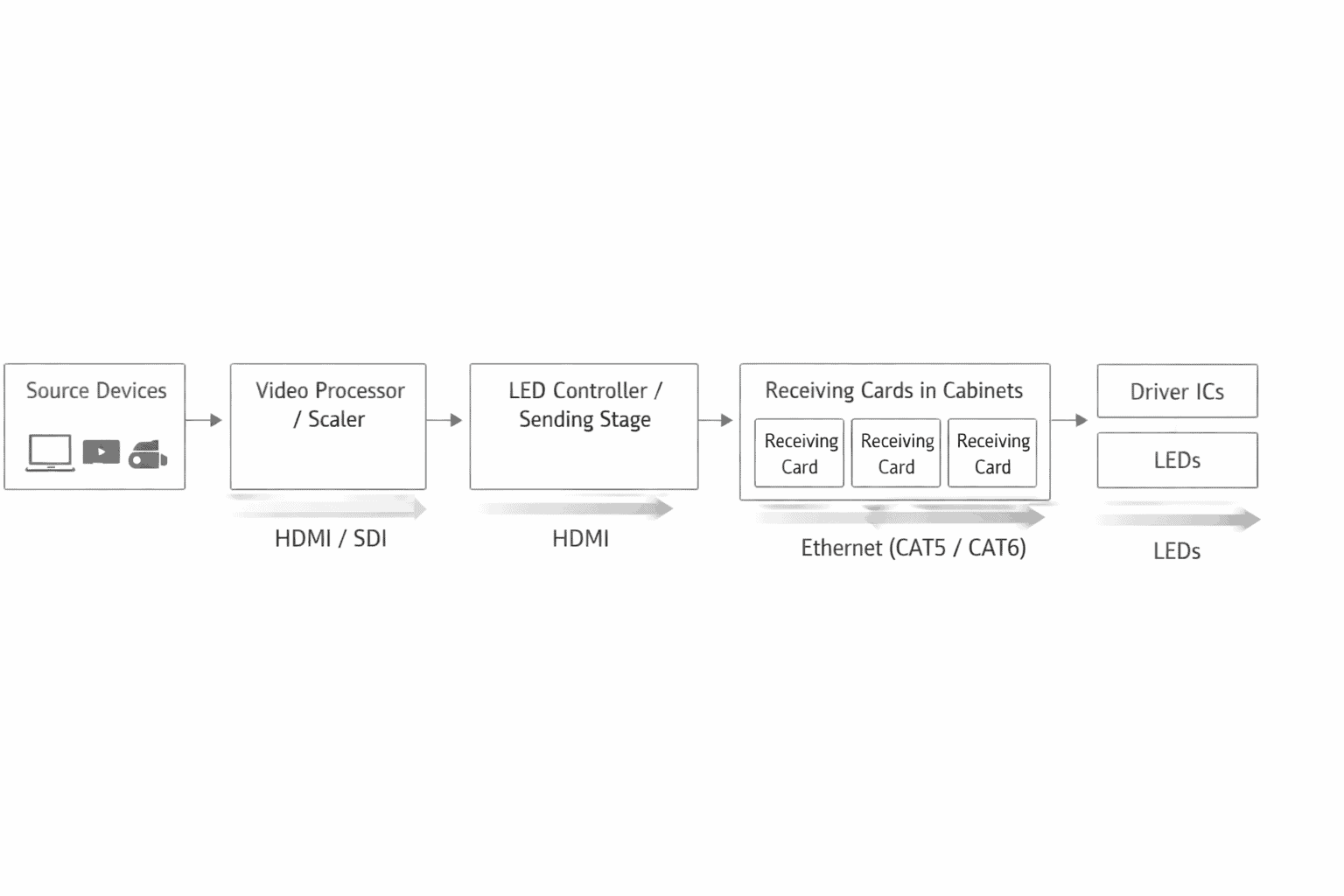
Source (laptop, media server, camera) → Processor (scales and maps the image) → Ethernet cables → Receiving cards (inside each LED cabinet) → LED panels (display the image)
In plain terms: the processor is the translator between your video source and the LED wall. It takes whatever resolution your source outputs, maps it to the exact pixel layout of your wall, and sends the right slice of image data to each panel.
NovaStar’s Seven Product Families at a Glance
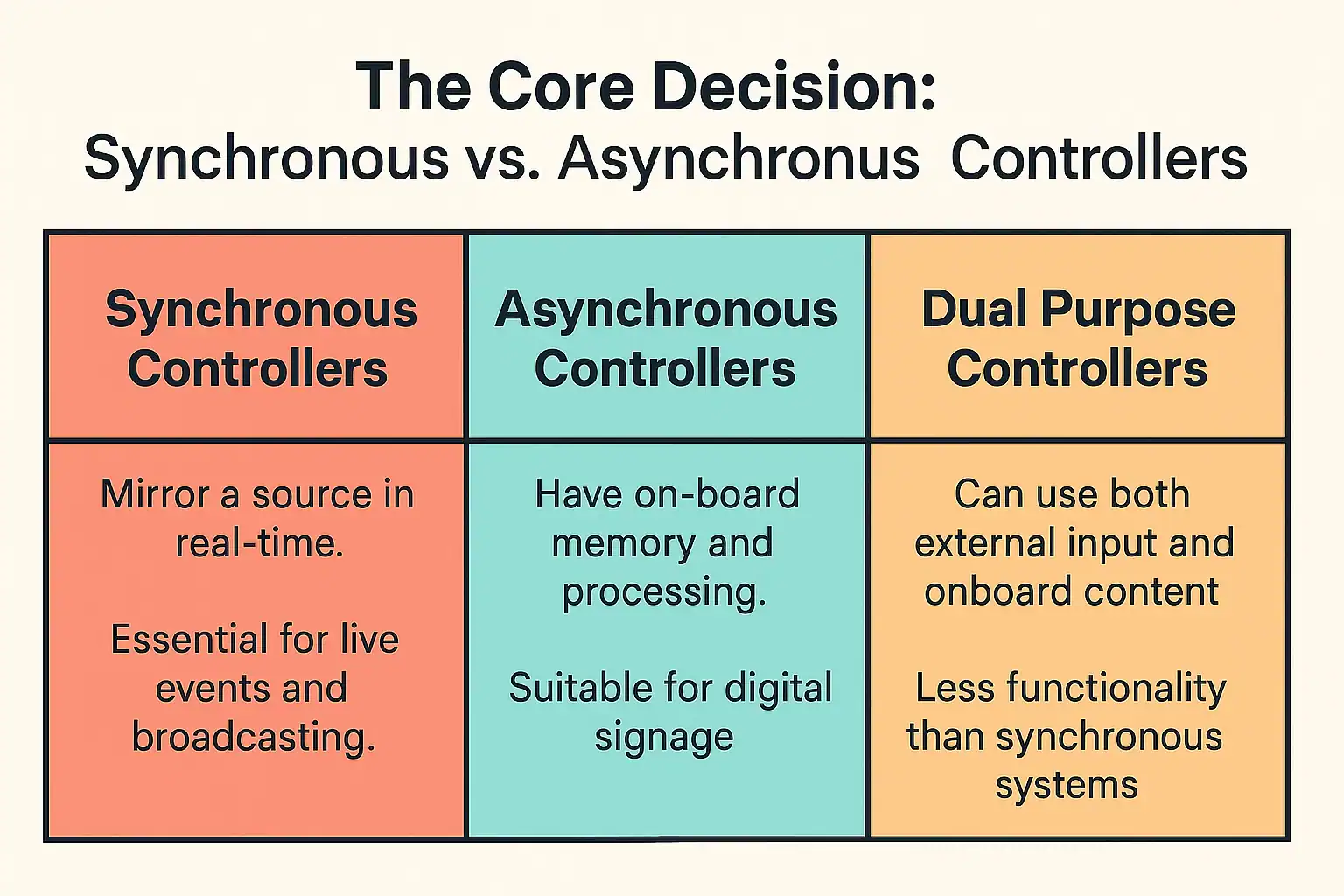
NovaStar covers every category of LED controller. The trick is matching the right family to your project:
| Family | Type | Pixel range | Suited to | Key differentiator |
|---|---|---|---|---|
| Taurus TB | Multimedia player (playback + sender) | 650K–2.3M | Digital signage, retail, pole screens, cloud-managed displays | Built-in content playback; VNNOX cloud management; no external source needed |
| Taurus TU | Smart multimedia player (playback + scaling + streaming) | 2.6M–13M | Boardrooms, hospitality, restaurants, residential AV | AirPlay, wireless projection, native apps (Teams, YouTube); cloud-managed |
| MCTRL | Sending box (no scaler) | 1.3M–8.8M | Budget signage, point-to-point setups | Cheapest entry; pairs with external processor or scaler |
| VX | All-in-one (processor + sender) | 2.6M–13M | Corporate, architectural, rental, sports | Built-in scaler, single-box simplicity |
| H-Series | Modular chassis + cards | 52M–520M | Control rooms, large multi-source walls | Unlimited input flexibility via card slots |
| Coex CX | Next-gen all-in-one | 9M–35.4M | Premium fixed installs, high-end XR studios | 8K input, HDR, 5G output option, next-gen image engine |
| Coex MX | Broadcast/XR controller | 3.9M–141M | Broadcast, virtual production, live filming | Genlock + 0-frame send-only mode; LiveGrade integration |
In plain terms: TB and TU are for screens that play their own content. MCTRL is a basic sender for budget jobs. VX is the workhorse for most live-source projects. H-Series is for massive or multi-source walls. Coex CX and MX are the premium tier — CX for high-end fixed installs, MX for anything that goes on camera.
Quick Selector — Which NovaStar Family Fits Your Project?
If you want the short answer before the deep dives, start here:
| Your project looks like… | Start here | Why |
|---|---|---|
| Small fixed indoor signage (retail, reception, menu boards) | Taurus TB30 or TB50 | Content-driven, no live source needed; cloud management via VNNOX |
| Large fixed indoor (commercial atrium, lobby, feature wall) | VX600 or VX1000 | All-in-one simplicity, built-in scaler, up to 6.5M pixels |
| Corporate AV / boardroom | TU15 Pro or VX400 Pro | TU if you want AirPlay + native apps; VX if it is a single HDMI/DP source with PIP or multi-source layering needs |
| Hospitality / restaurant / residential | TU15 Pro or TU20 Pro | Wireless projection, remote control, native streaming apps, compact form factor |
| Retail window / transparent LED | TB50/TB60 or VX400 Pro | TB if content is pre-scheduled; VX if the source is live |
| Broadcast / studio | Coex MX40 Pro or MX2000 Pro | Genlock, 0-frame latency, SDI inputs, LiveGrade compatibility |
| Large outdoor commercial | VX1000 or NovaPro UHD Jr | Weather-sealed cabinets; processor in rack; up to 10.4M pixels |
| Rental / touring — small (≤6.5M px) | VX600 or VX1000 | Portable, single-box, fast setup |
| Rental / touring — large (>6.5M px) | NovaPro UHD Jr, VX2000 Pro, or H2 | Scale up: NovaPro UHD Jr to 10.4M, VX2000 Pro to 13M, H2 to 52M |
| Control room, many signal sources | H-Series (H2–H15 Enhanced) | Modular input cards for multi-source dashboards |
| dvLED in Microsoft Teams Rooms | TU15 Pro or VX400 Pro | TU for native Teams app; VX for codec HDMI pass-through |
| Content-driven / cloud-managed deployments | Taurus TB + VNNOX | No on-site source; schedule and push content remotely |
For the full picture on LED video walls and what goes into specifying them, our LED display buying guide covers the broader decision, and our guide to LED displays explains the underlying display technology.
Taurus TB Series — Cloud-Managed Multimedia Players
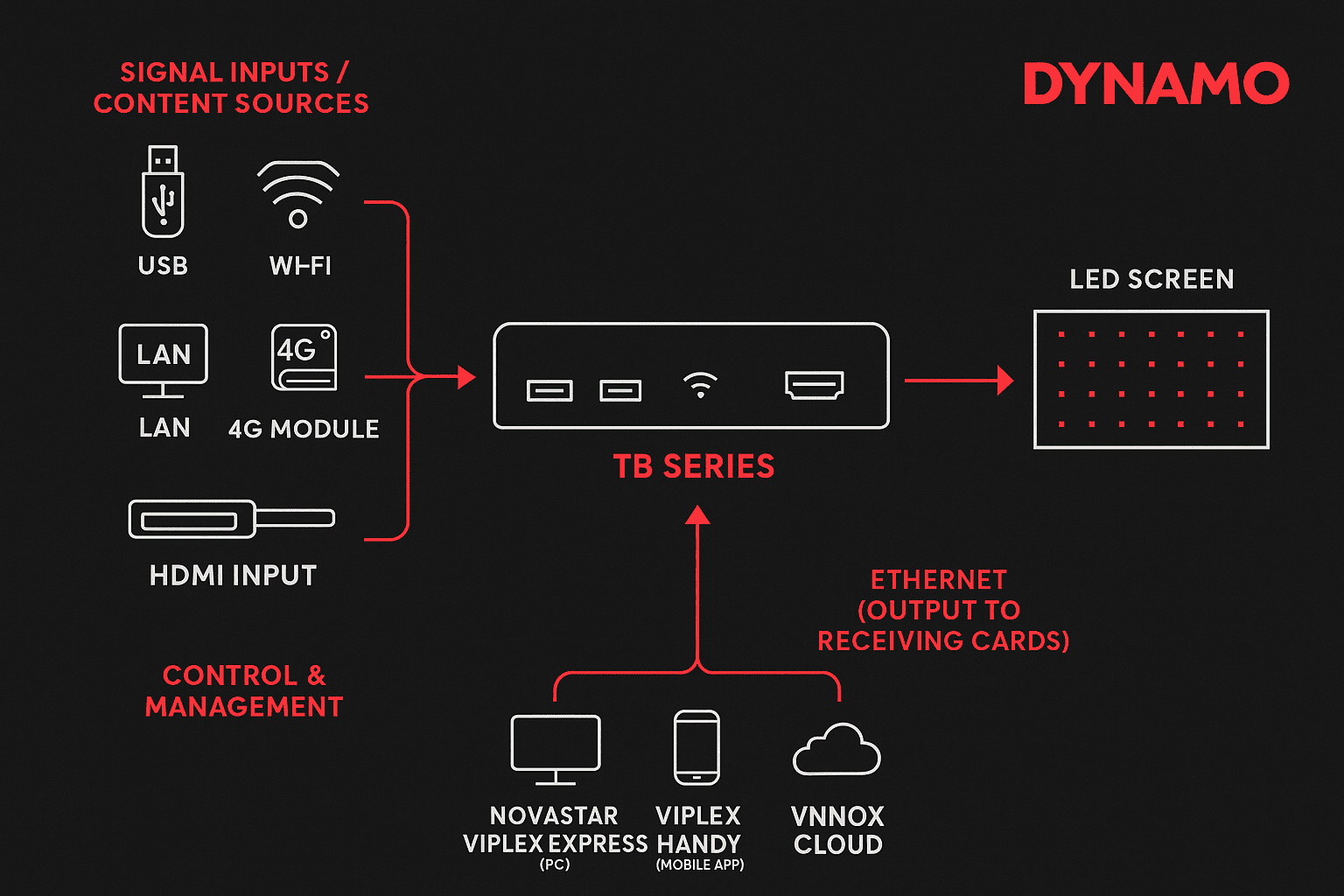
The Taurus TB series combines content playback and LED sending in a single compact box. There is no external video source — the TB stores content locally and plays it back on a schedule, managed remotely via NovaStar’s VNNOX cloud platform. Think of it as a media player and a sending card fused into one unit.
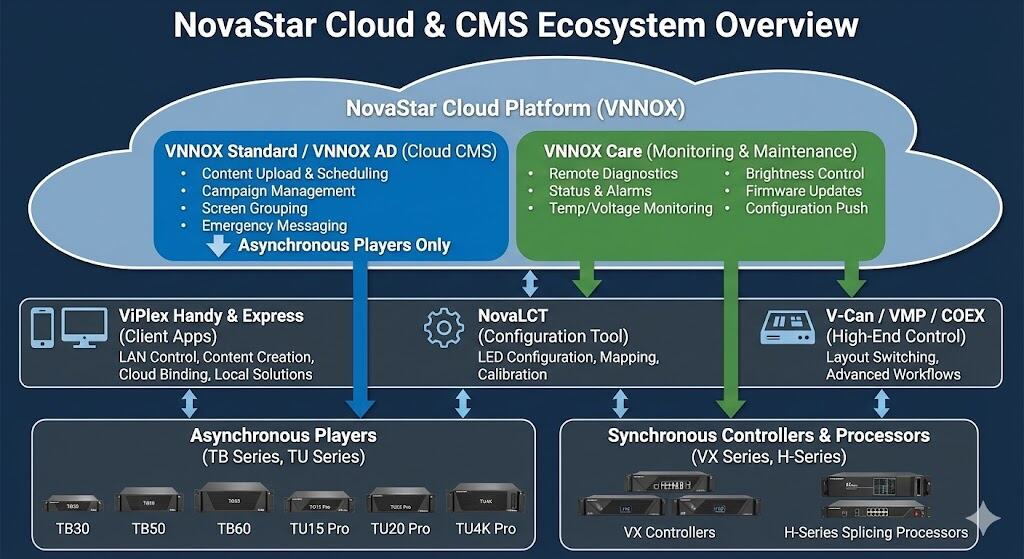
How Taurus TB Works
- Dual-mode operation: asynchronous (standalone playback from stored content) and synchronous (pass-through from an external HDMI source).
- Cloud management via VNNOX: schedule playlists, push content updates, monitor screen health — all from a browser, anywhere.
- Connectivity: Wi-Fi, optional 4G, and Ethernet for remote management.
- Decoding: H.264/H.265 4K at 60 Hz on all current models.
Current TB Lineup
| Model | Pixel capacity | Ethernet outputs | Key feature |
|---|---|---|---|
| TB30 | 650,000 | 1 (+1 backup) | Entry-level cloud player |
| TB50 | 1,300,000 | 2 | Mid-range, expanded output |
| TB60 | 2,300,000 | 4 | Highest TB capacity |
UK / Europe note: The TB1, TB2 and TB40 exist in NovaStar’s global Taurus range but, per advice from NovaStar’s UK team, are not licensed for sale into the UK or European markets. UK and European specifiers should stick to the TB30, TB50 and TB60.
When to choose Taurus TB: Content is pre-built — videos, images, scheduled playlists — and pushed remotely. No live video source sits on site. Ideal for retail chains, transport information screens, advertising pole screens, and any deployment where cloud-based content management matters more than live video processing. For more on the cloud side, see our NovaStar Cloud CMS guide.
Taurus TU Series — Smart Multimedia Players for Boardrooms and Hospitality
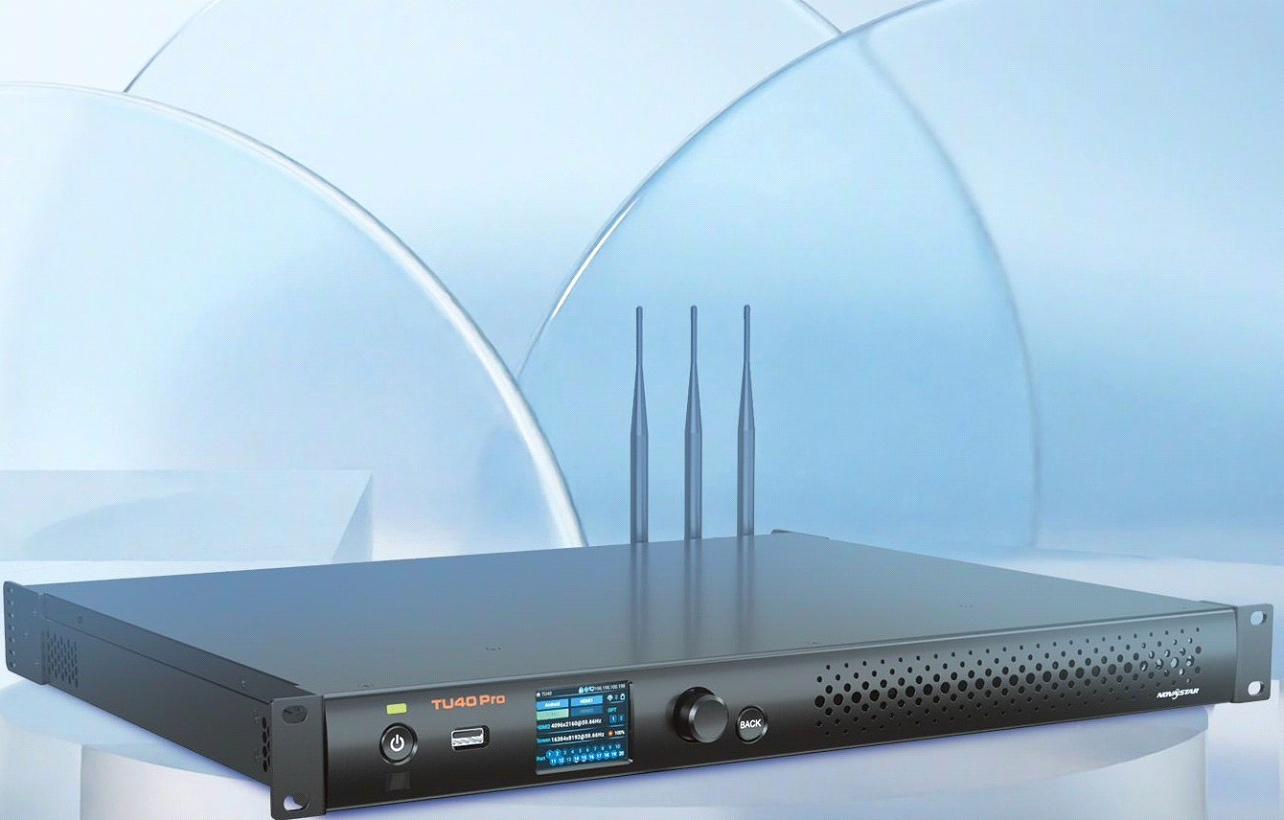
The Taurus TU does everything the TB does — content playback, VNNOX cloud management, built-in sending — and adds AirPlay streaming, wireless projection, native apps (Microsoft Teams, YouTube, web browsers), remote control, and built-in scaling. Where TB is a pure signage device, TU is designed for spaces where people interact with the screen.
Current TU Lineup
| Model | Pixel capacity | Ethernet outputs | Key differentiator |
|---|---|---|---|
| TU15 Pro | 2,600,000 | 4 | AirPlay, wireless projection, native apps; entry-level smart player |
| TU20 Pro | 3,900,000 | 6 | Higher capacity; same smart features as TU15 Pro |
| TU4K Pro | 8,800,000 | 20 (+2 SFP+) | Flagship; 8K decode, 13M pixels in scaling mode, HDMI 2.0 input |
All TU models run Android, support VNNOX cloud management, and include built-in scaling. The TU4K Pro is notable — 20 Ethernet outputs and 2 SFP+ fibre outputs put it in the same connectivity class as the VX2000 Pro, but with standalone playback and smart features built in.
When to choose Taurus TU: The screen needs to do more than play pre-scheduled content — boardroom presentations, AirPlay mirroring, Teams on the wall, restaurant displays with live app content, residential media walls.
MCTRL Series — The Dedicated Sending Box
An MCTRL is not a processor — it is a sender. It passes a video signal pixel-for-pixel to the receiving cards. No scaling, no cropping, no PIP. If your source resolution matches the wall, an MCTRL is the simplest and cheapest option.
MCTRL Lineup
| Model | Pixel capacity | Ethernet outputs | Input | Use case |
|---|---|---|---|---|
| MCTRL300 | 1,300,000 | 2 | DVI | Small signage, single-cabinet displays |
| MCTRL660 | 2,300,000 | 4 | HDMI + DVI | Mid-size installs, legacy rental sender |
| MCTRL660 PRO | 3,900,000 | 6 (+2× 10G optical) | HDMI 1.4a, 3G-SDI | Current rental workhorse; SDI input, fibre outputs |
| MCTRL4K | 8,800,000 | 16 (+4 optical) | DP 1.2, HDMI 2.0, Dual DVI | Large walls needing 4K source at full resolution; HDR, genlock |
The MCTRL660 PRO has largely superseded the original MCTRL660 as the modern rental sender — same form factor, but with SDI input, 10G optical outputs and 3.9M pixel capacity. The MCTRL4K steps up to 4K input and 8.8M pixels with fibre outputs for long cable runs. For modern live-source work, VX-series all-in-ones are now the more common default; sender boxes remain the right tool when you have a separate scaler already in the chain.
When to choose MCTRL: Budget-focused, or you already have a separate scaler in the signal chain. If source resolution does not match the wall, you need a VX or higher.
VX Series — All-in-One Processing and Sending
The VX series is the workhorse of the NovaStar range. It combines video processing (scaling, layering, PIP) and sending in a single unit. For roughly 80% of corporate, architectural and LED screen hire projects, a VX is the right call.
VX Lineup
| Model | Pixel capacity | Ethernet outputs | Key inputs | Genlock |
|---|---|---|---|---|
| VX400 Pro | 2,600,000 | 4 (+1× 10G optical, +1 backup) | HDMI 2.0, HDMI 1.3 ×2, 3G-SDI | No |
| VX600 | 3,900,000 | 6 (+2 SFP+) | Same as VX400 | Yes |
| VX1000 | 6,500,000 | 10 (+2 SFP+) | Same as VX400 | Yes |
| NovaPro UHD Jr | 10,400,000 | 16 | HDMI 2.0, DVI ×4, DP 1.2, 12G-SDI ×2 | Yes |
| VX2000 Pro | 13,000,000 | 20 (+4 SFP+) | HDMI 2.0 ×2, HDMI 1.3 ×4, DP 1.2, 12G-SDI | Yes |
All VX Pro models support HDR (HDR10/HLG), 10/12-bit colour depth and OSD overlays. Genlock is available from the VX600 upward — relevant if the wall appears on camera, though for serious broadcast work the Coex MX is the proper tool.
When to choose VX: Corporate AV, architectural feature walls, sports venues, transport hubs, general rental and touring — any project up to 13M pixels that does not need broadcast-grade features or standalone content playback.
H-Series — Modular Chassis for Large-Scale and Multi-Source Walls
When pixel load exceeds the VX2000 Pro’s 13M ceiling, or you need many simultaneous signal sources, the H-Series is the answer — a modular chassis you populate with the input and output cards your project demands.
How the H-Series Works
A bare chassis ships with a control card and power supplies. Slot in output (sending) cards — each drives ~13M pixels via 20× RJ45 ports — and input cards for your signal types: HDMI, DisplayPort, 12G-SDI, HDBaseT, NDI, ST 2110, or fibre.
Choosing a Chassis
| Chassis | Rack units | Max input cards | Max output cards | Max pixel load | Suited to |
|---|---|---|---|---|---|
| H2 | 2U | 4 | 2 sending | 52M | Compact installs, moderate multi-source |
| H5 | 5U | 10 | 3 sending | 78M | Mid-size control rooms |
| H9 | 9U | 15 | 5 sending | 130M | Large control rooms |
| H9 Enhanced | 9U | 15 | 10 sending | 260M | High-density output needs |
| H15 | 15U | 30 | 10 sending | 260M | Maximum input flexibility |
| H15 Enhanced | 15U | 30 | 16 sending | 416M | High-density H15 with enhanced output cards |
| H20 | 20U | 40 | 20 sending | 520M | Top of the H-Series range — extreme multi-source walls |
Pixel-load figures reflect the maximum achievable with current-generation sending cards (H_4× fibre sending card, enhanced). Real-world deployments rarely approach these ceilings; most control-room walls land between 30M and 100M pixels.
When to choose H-Series: Control rooms with many simultaneous signal sources, or walls exceeding the VX2000 Pro’s 13M pixel ceiling (where broadcast-grade features are not the priority). The H-Series also supports redundant power supplies from the H5 upward.
Coex CX Series — NovaStar’s Next Generation
The Coex CX sits between the VX and the broadcast-grade MX — next-generation image processing (8K input, HDR, 5G Ethernet output) with substantially higher capacity than the VX range.
CX Lineup
| Model | Pixel capacity | Outputs | Key inputs |
|---|---|---|---|
| CX40 Pro | 9,000,000 | 6× 5G EtherCON (+1 QSFP+) | HDMI 2.0, DP 1.2, 12G-SDI |
| CX80 Pro | 35,400,000 | 16 outputs (modular) | HDMI 2.1 (8K), DP 1.4, 12G-SDI |
Both models integrate with NovaStar’s Vision Management Platform (VMP) for centralised control and monitoring.
When to choose CX: Premium fixed installs requiring HDR or 8K, or high-end XR studios where image quality outweighs broadcast-specific genlock. For pixel pitch ranges relevant to these installs, see our MicroLED guide.
CX80 Pro vs MX2000 Pro at 35.4M pixels. Both processors share the same headline pixel ceiling, but they sit in different worlds: the CX80 Pro is built for premium fixed installs where 8K input, HDR and next-generation image processing matter most. The MX2000 Pro is built for broadcast and XR stages where camera-locked genlock, 0-frame send-only mode and 480 Hz refresh matter most. If the wall is going on camera, choose MX. If it is a flagship corporate or retail install, choose CX.
Coex MX Series — Built for Broadcast and Virtual Production

If the LED wall appears on camera, the NovaStar LED processor you need is a Coex MX — engineered for the image quality, timing precision and latency control that broadcast and virtual production demand.
MX Lineup
| Model | Pixel capacity | Outputs | Key inputs | Suited to |
|---|---|---|---|---|
| MX20 | 3,900,000 | 6× GbE + 2× 10G optical | HDMI 1.3 ×2, 3G-SDI, Genlock | Small broadcast, studio monitors |
| MX30 | 6,500,000 | 10× GbE + 2× 10G optical | HDMI 2.0, HDMI 1.4, DP 1.1, 3G-SDI ×2, Genlock | Mid-size studio walls |
| MX40 Pro | 9,000,000 | 20× GbE + 4× 10G optical (sync output) | HDMI 2.0 ×3, DP 1.2, 12G-SDI, Genlock | XR stages, virtual production |
| MX2000 Pro | 35,400,000 | Modular: 4× 10G fibre output cards (up to 40 GbE equivalent), or 1× 40G fibre output card | Modular: 4× HDMI 2.0, 4× DP 1.2, 4× 12G-SDI, 2× HDMI 2.1, or 2× DP 1.4 | Large broadcast walls, multi-camera, XR |
| MX6000 Pro | 141,000,000 | Modular (up to 8 output cards) | Modular (up to 32× 4K or 8× 8K) | Largest broadcast and live event walls |
What Sets MX Apart
- Genlock input for camera-locked output — the processor’s frame timing locks to your camera’s sync signal, eliminating scan-line tearing on screen.
- 0-frame send-only mode — eliminates all processing latency. The image reaches the LED wall with zero added frames of delay, critical when the wall is a background in a live camera shot.
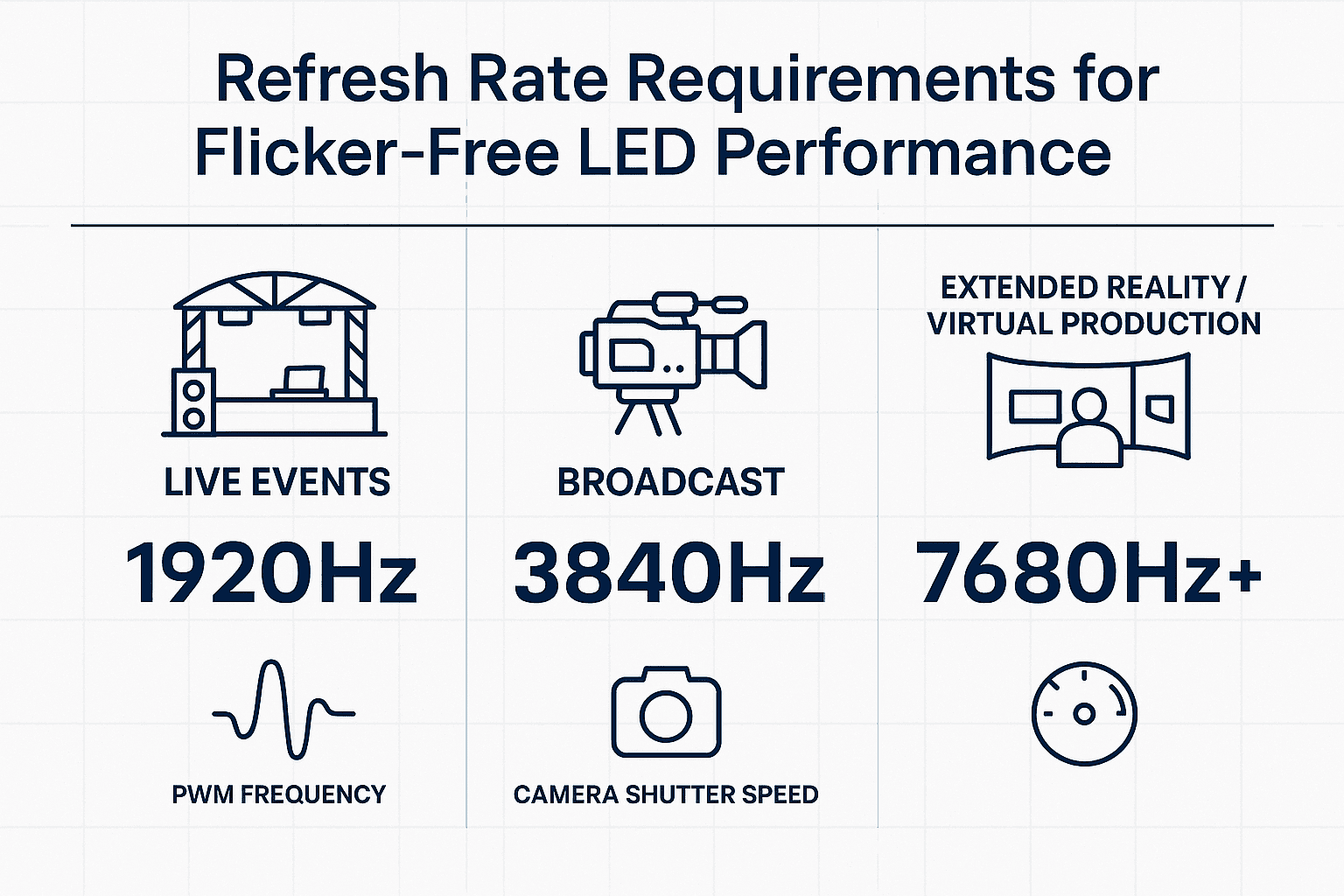
- HDR support, 12-bit colour depth, up to 480 Hz refresh (MX2000 Pro) — visual performance matched to broadcast production standards.
- VMP integration — the Vision Management Platform provides centralised control across multiple MX units on a single stage.
For a real-world example of virtual production LED in action, see our XR LED studio case study.
The Coex Image-Quality Stack: NovaStar Calibration + Pomfort LiveGrade
Image processing and uniformity are the foundations this stack sits on.
This is where Coex MX separates itself from every other LED controller on the market for virtual production work.
Calibration baseline. NovaStar’s own calibration system — Chrome Calibration software paired with CC3 or CC60 camera units and Coex controllers — handles factory-batch uniformity and full-screen calibration on site. Four tiers cover the full lifecycle: cabinet calibration (factory), full-screen (post-install uniformity), full greyscale (premium fixed and MicroLED), and low greyscale (dark-end performance for cinema and broadcast). This is what gives a Coex-driven wall its baseline image consistency before any creative grading happens.
LiveGrade on top. Once the wall is uniform, Pomfort LiveGrade Studio sits on top for on-set creative colour grading. LiveGrade is the film and TV industry’s standard for on-set look definition — the DP or colourist defines a creative look in real time and passes the same grade to post-production. Coex MX processors (MX40 Pro, MX2000 Pro, MX6000 Pro, firmware V1.4.0+) expose a real-time API that lets LiveGrade push 3D LUTs directly to the processor — no LUT export/import round-trip. The on-set DIT drives the LED wall the same way they drive every other camera output: CDL plus 3D LUT, in real time, matching foreground and LED content into one image. Buying note: LiveGrade 7.1+ includes an LED Processing & Control module that re-unifies NovaStar integration.
Why this matters commercially. Factory-grade calibration plus on-set creative control via the industry-standard Pomfort workflow — this is why Coex MX shows up on virtual production stages and broadcast studios. A VX or H-Series, however capable, is not a like-for-like substitute when the brief calls for camera-integrated colour management. The LiveGrade integration is the feature that makes a colourist’s workflow genuinely native to the LED wall.
When to choose MX: Any project where the LED wall appears on camera — broadcast studios, virtual production stages, live filming, XR volumes. If genlock or 0-frame latency is in the spec, MX is the answer.
Master Comparison — All Families Side by Side
| Spec | Taurus TB | Taurus TU | MCTRL | VX | H-Series | Coex CX | Coex MX |
|---|---|---|---|---|---|---|---|
| Type | Multimedia player | Smart multimedia player | Sending box | All-in-one controller | Modular chassis | Next-gen all-in-one | Broadcast controller |
| Pixel range | 650K–2.3M | 2.6M–13M* | 1.3M–8.8M | 2.6M–13M | 52M–520M | 9M–35.4M | 3.9M–141M |
| Built-in scaler | No | Yes | No | Yes | Yes | Yes | Yes |
| Built-in playback | Yes (CMS) | Yes (CMS + apps) | No | No | No | No | No |
| Cloud management | Yes (VNNOX) | Yes (VNNOX) | No | No | No | Via VMP | Via VMP |
| Wireless projection | No | Yes (AirPlay, Type-C) | No | No | No | No | No |
| Genlock | No | No | MCTRL4K only | From VX600 | Yes | Yes | Yes (camera-grade) |
| 0-frame latency | No | No | No | No | No | No | Yes |
| HDR | No | No | MCTRL4K only | Yes | Yes | Yes | Yes |
| 8K input | No | TU4K Pro (decode) | No | No | Via cards | CX80 Pro | MX2000/6000 Pro |
| Typical price band | Entry | Entry–mid* | Entry | Mid | High–very high | High | High–very high |
* TU4K Pro: 8.8M pixels in pixel-to-pixel mode, 13M pixels in scaling mode.
From the Field — Daniel Reynolds
Most processor selection mistakes I see come from two places: oversizing and wrong-family. Integrators read the H-Series specs, get excited by the numbers, and spec a chassis for a boardroom that needs a VX400. Or they put a sending box on a project that needs scaling, then wonder why the image does not map.
The practical rule: start with pixel load, then ask “does this wall play its own content, or receive a live signal?” That single question splits the NovaStar range in half. Self-playing signage = Taurus, and the conversation is about cloud management. Live source = VX or above, and the conversation is about inputs, scaling and whether the wall goes on camera.
The TU series has been a genuine shift for boardrooms. Before TU, a meeting-room LED wall meant three boxes — processor, media player, scaler. Now it is one unit that handles AirPlay, Teams, content playback and LED sending. Cleaner install, and the client does not need an AV degree to use it.
How to Match a NovaStar LED Processor to Your Project
Choosing the right processor comes down to five questions, asked in order. Answer each one and the field narrows fast.
Step 1: Do You Need a Live Video Source?
If the content is pre-built and cloud-managed — retail playlists, transport information, advertising loops — you want a Taurus TB (for pure signage) or Taurus TU (if users need to interact with the screen, present wirelessly, or run native apps). No external source, no processor in the traditional sense. Skip to VNNOX configuration.
For boardrooms, hospitality, and conferencing rooms where the source is a single HDMI/Type-C input — including Microsoft Teams Rooms, Zoom Rooms, AirPlay or native streaming apps — a Taurus TU covers it. The TU is a multimedia player with full live-source handling; you do not need to step up to a VX unless the wall exceeds the TU range’s capacity or you need multi-source layering.
If you do need a live source AND multi-source layering, PIP, or video-wall scaling, continue to step 2.
Step 2: Calculate Your Total Pixel Load
Screen width in pixels × screen height in pixels = total pixel load. Every NovaStar LED processor has a maximum. For example, a 4,000 × 2,000 pixel wall = 8,000,000 pixels. That rules out everything below the MCTRL4K / VX1000 tier.
Not sure of your pixel dimensions? Work backwards: physical size ÷ pixel pitch. A 4-metre-wide wall at 2.5 mm pitch = 1,600 pixels wide. Our UK pricing guide covers how pitch and size interact, and our LED video wall viewing distance guide walks through how the closest viewer constrains pitch.
Step 3: Count Your Signal Sources
One HDMI from a laptop? A VX handles that. Eight cameras plus four PCs in a control room? You need an H-Series with enough input card slots.
Step 4: Check for Broadcast/XR Requirements
Does the wall appear on camera? Do you need genlock, 0-frame latency, or camera-locked output? If yes, Coex MX. If the project is high-end fixed installation with HDR and 8K, Coex CX. For ultra-fine-pitch rental projects, see our 1.2mm rental display guide. If neither, VX or H-Series.
Step 5: Pick the Smallest Model That Covers Your Pixel Load and Port Count
Oversizing wastes budget. Undersizing means you cannot drive the full wall. Match the processor’s pixel capacity to your calculated load, then confirm it has enough Ethernet output ports (each port drives approximately 650,000 pixels at 60 Hz).
NovaStar Coex MX vs Brompton Tessera
Brompton Tessera is the other broadcast-grade name in LED, used heavily on UK and US virtual-production stages. The honest comparison:
- What Brompton does well: camera-native colour science, on-stage LUT loading, and a workflow that has become the de-facto standard on high-end XR stages and music tours. Many DPs and colourists already know the Tessera control surface.
- What Coex MX does well: tighter integration with the rest of the NovaStar processor stack (genlock, 0-frame mode, VMP control), with Pomfort LiveGrade providing real-time colour grading in the same workflow space Tessera occupies. The MX2000 Pro and MX6000 Pro extend further into very-large-wall territory than current Tessera systems.
- How to decide: if the colourist or DP team has standardised on Tessera, that often drives the processor choice. If the integrator is already running NovaStar elsewhere on the production (signage, fixed install, control rooms) and the stage needs broadcast-grade timing, a Coex MX keeps the toolchain consistent. Both can deliver the visual result; the choice is workflow-led.
NovaStar LED Processor: Frequently Asked Questions
What is the difference between an LED controller and a video processor?
In NovaStar’s range, the terms overlap. A controller (VX series) combines processing and sending. An MCTRL is a sender only — no scaling. The key question: do you need scaling and layering, or just signal distribution?
How do I calculate which NovaStar processor I need for my LED wall?
Multiply pixel width by pixel height to get total pixel load. Pick the smallest NovaStar unit whose capacity exceeds that number, then confirm it has enough Ethernet outputs (each drives ~650,000 pixels at 60 Hz). Or work through our NovaStar processor calculator guide.
What is the NovaStar H-Series and when should I use it?
A modular chassis system — rack-mount frame (2U to 20U) populated with input and output cards. Use it when pixel load exceeds 13M or you need many simultaneous signal sources (e.g. a control room with twelve camera feeds).
Can one NovaStar processor drive multiple LED screens?
Yes, provided total pixel load stays within the processor’s capacity and you have enough output ports. For independent content on each screen, a Taurus TB per screen (cloud-managed via VNNOX) is often simpler.
What does genlock do on an LED processor?
Genlock locks output timing to an external reference signal from a camera system, eliminating scan lines and banding on screen. Essential for broadcast and VP. Available on VX600 and above, all H-Series, and the full Coex range.
Is the VX series better than the MCTRL series?
Different tools for different jobs. VX includes a scaler, layering engine and more inputs — a complete processor. MCTRL is a sender only for projects where source resolution matches the wall. MCTRL costs less; VX does more.
Do I need a NovaStar processor for a small LED display?
Every LED display needs a controller. For small displays under 650,000 pixels, a Taurus TB30 combines content playback and LED sending in one box. For single-cabinet setups with an external source, the MCTRL300 is the entry-level sender.
What is the NovaStar Taurus TB series and when should I use it?
A multimedia player that doubles as an LED sender — stores content locally, plays it on a schedule, drives the panels directly. No external source needed. Managed via the VNNOX cloud platform. Designed for digital signage, retail and transport information. For retail-specific guidance on display selection, see our retail LED display buying guide.
How do I know which NovaStar processor I have?
Check the model name printed on the front panel or the label on the underside of the unit, which gives the family (MCTRL, VX, TB, TU, H-Series or Coex) and model number. If the unit is already connected, NovaLCT or the Coex web interface reports the sending card model and firmware version under the device information tab, which is also the quickest way to confirm its pixel capacity and output count.
Summary
Choosing a NovaStar LED processor is a sizing and use-case exercise. Calculate your pixel load, decide whether the wall plays its own content or receives a live signal, check for broadcast requirements, and the right family reveals itself. Seven families cover every project scale — from a single retail screen on a TB30 to a 141-million-pixel broadcast wall on an MX6000 Pro.
Get a quote for your LED wall and processor. Send us the canvas size, sources and whether the wall needs broadcast timing and we will size the NovaStar unit with the panels: contact Dynamo LED Displays or call 020 3489 9878.
Specifications sourced from NovaStar and the NovaStar controller range and the NovaStar product showcase. Updated September 2026.
Related processor sizing tool: NovaStar LED processor calculator — sizing guide.