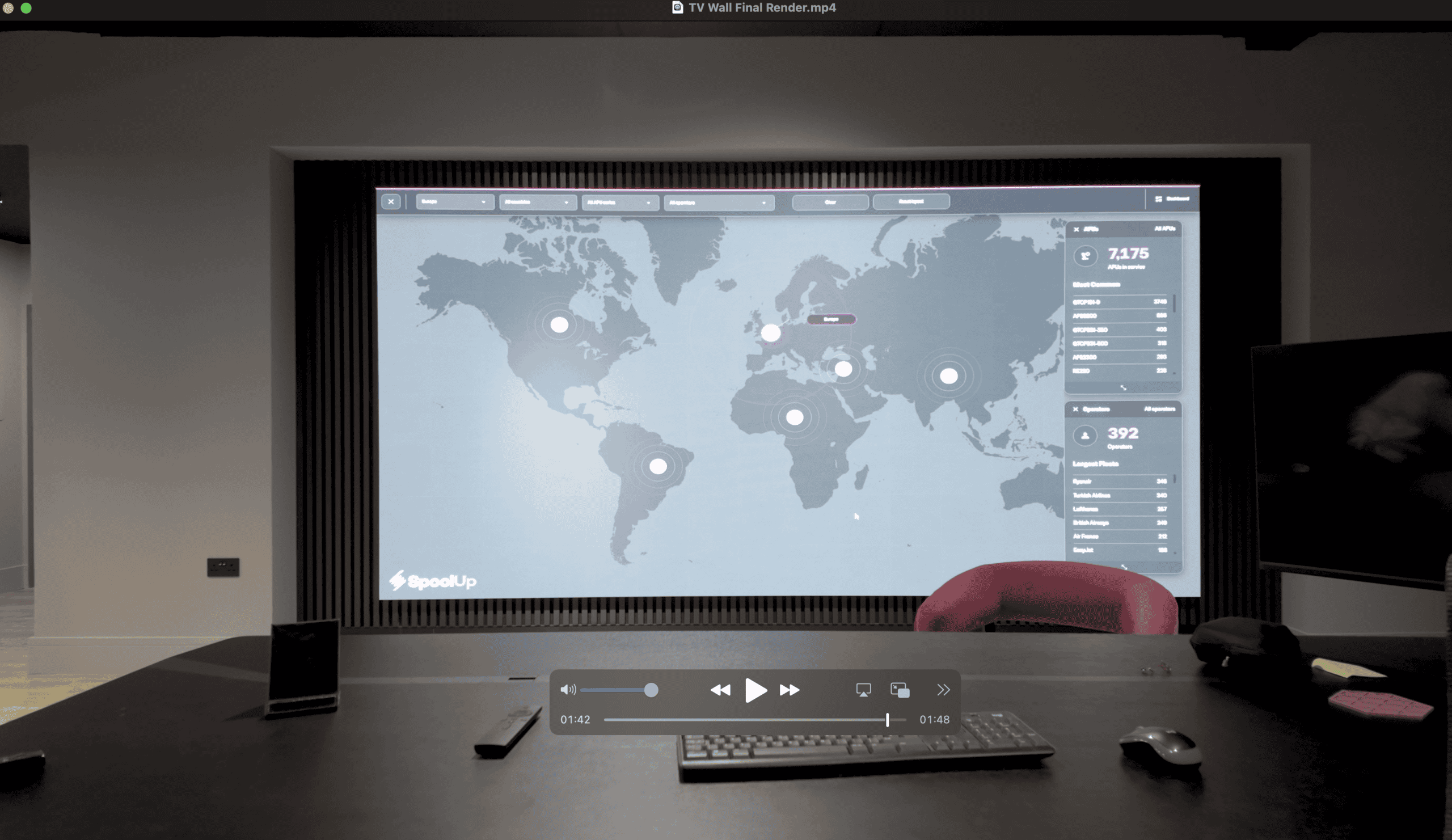
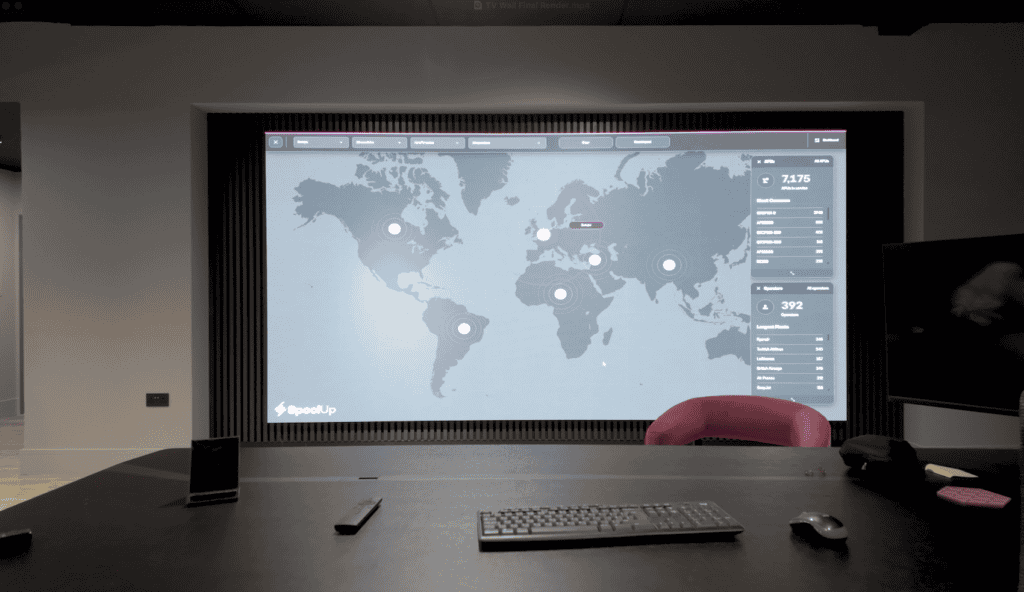
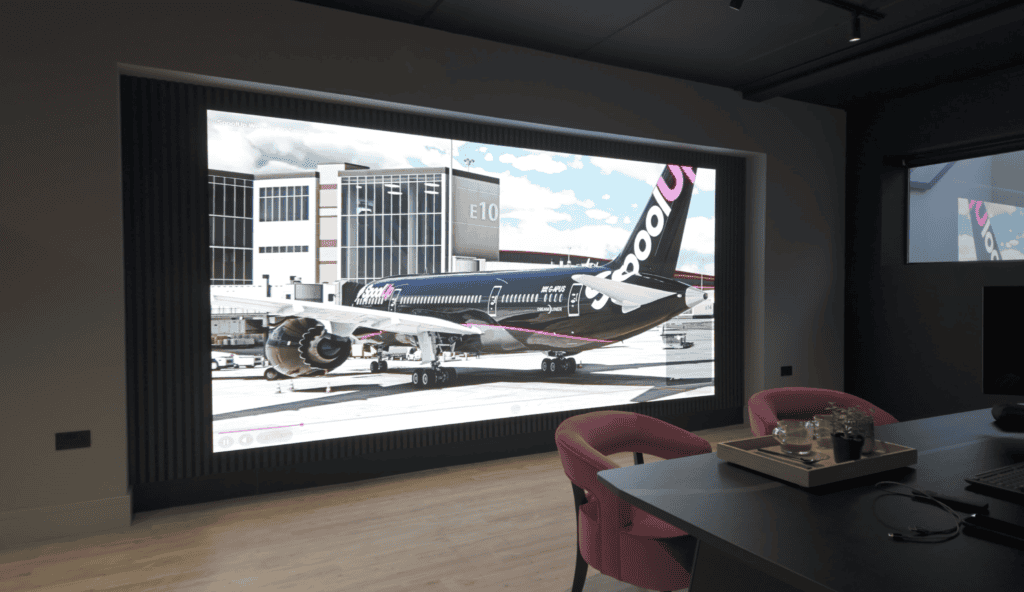
Dynamo LED Displays installed a 4 m × 2 m, 1.9 mm pixel pitch DX Series LED video wall at Spool Up’s headquarters in Winchester, wall-mounted and front-serviceable, for client presentations, team meetings and scheduled brand content. It is specified for 1.5 m to 3 m viewing and controlled through a CMS, a wired PC input and wireless mirroring.
Updated September 2026. Case study first published January 2026.
A well-specified LED video wall can do more than look impressive. It can become a practical sales and communication tool that works all day, every day. In this case study, we installed a 4 m × 2 m, 1.9 mm LED video wall at Spool Up’s headquarters in Winchester to support client presentations, internal collaboration and always-on brand content.
The outcome is a clean, architectural wall-mounted finish with flexible control options, designed around real viewing distances (1.5–3 m) and day-to-day usability rather than brochure specs.
Key takeaways
- A 4 m × 2 m DX Series wall at 1.9 mm gives a native 2048 × 1024 canvas from an 8 × 2 layout of 500 mm × 1000 mm cabinets (256 × 512 pixels each).
- Choose pixel pitch from the closest seat and the smallest text on screen, not from the room size. Here that was 1.5 m and dashboard labels.
- Three control routes cover every meeting: scheduled CMS content, a wired PC input for presentations and wireless mirroring for quick sharing.
- Wall mounting with front service keeps the build slim, but the wall structure, cabling and heat path still need a survey.
- Plan phase two on day one: network, control and content workflow should scale to further walls without a rebuild.
Project at a glance
Client: Spool Up (HQ, Winchester)
Display type: Indoor DX Series LED video wall (1.9mm pixel pitch)
Physical size: 4.0m (W) × 2.0m (H)
Typical viewing distance: ~1.5m to 3m (standing + seated)
Primary uses: Client presentations, team meetings, scheduled marketing/brand content
Control options: Dynamo CMS + local PC input + NovaStar TU40 Pro wireless mirroring (incl. AirPlay on macOS)
Mounting approach: Wall‑mounted, front‑serviceable, minimal visible structure
Note on resolution: A common way to build a 4m × 2m DX wall is an 8 × 2 layout of 500mm × 1000mm cabinets. With DX P1.9, a 500 × 1000 cabinet is typically 256 × 512 pixels, giving a native canvas of 2048 × 1024 pixels (2:1 aspect).
(Exact cabinet layout can vary by site constraints and is confirmed during survey.)
Why offices are moving beyond TVs and projectors
In many offices and showrooms, large LCD displays and projectors reach their practical limits quickly:
Scaling: Multiple LCDs introduce bezel lines; projectors struggle with ambient light and screen surface constraints.
Impact: A single, seamless LED canvas can present product visuals, dashboards, or film content at a scale that feels purposeful in a client space.
Flexibility: LED walls can switch from “presentation mode” to scheduled branded content without re‑cabling or moving equipment.
Comparison: LED wall vs LCD wall vs projector (office/showroom)
| Factor | Direct-view LED video wall | LCD video wall | Projector |
|---|---|---|---|
| Seamless image | Yes (no bezel lines) | No (bezels remain visible) | Yes, but depends on surface and alignment |
| Brightness control in mixed lighting | Very good (tunable for day/evening use) | Good | Often limited in bright rooms |
| Screen size & aspect ratio freedom | Very flexible (modular) | Moderate (panel sizes constrain layout) | Flexible, but distance/throw constraints apply |
| Typical “client wow factor” in showrooms | Very high (scale + seamlessness) | Medium (bezel distraction) | Medium (brightness and contrast vary) |
| Service access | Often front-serviceable (model dependent) | Front serviceable, but panel replacement can be problematic due to colour matching or discontinued models | Lamp/laser servicing + alignment considerations |
Choosing pixel pitch for 1.5–3m viewing distances
Pixel pitch (e.g., 1.9mm) is the distance between LED pixels. In an office, it’s one of the biggest drivers of perceived sharpness — especially for:
Small text in dashboards
Spreadsheets and product specs
UI elements in demos
PowerPoint/Keynote content
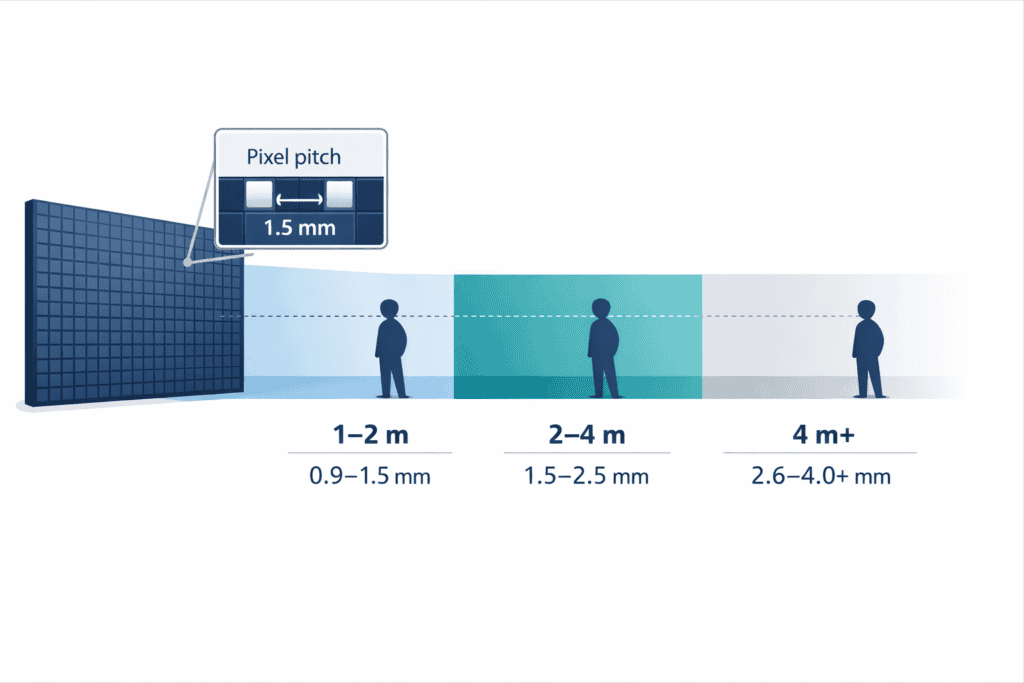
With Spool Up, the viewing zone ranged from ~1.5m (closest) to ~3m (typical), so we selected a pitch that keeps the image looking continuous at those distances — without over‑specifying the system.
If you’re comparing pitches, focus on your closest viewers and the smallest content you need to read. Pixel pitch guidance is often discussed using practical rules of thumb (rather than hard limits), and viewing distance should always be considered alongside content type.
Reference: AVIXA — How to Choose the Right Pixel Pitch
Quick planning checklist: pixel pitch selection (office)
Measure the closest viewing position (don’t guess).
Identify your “smallest important content”:
e.g., a KPI dashboard label, pricing table, technical diagram annotations.
Decide if the wall will be used for static content, video, or mixed (mixed usually needs the most care).
Confirm whether the wall will run native resolution content (preferred) or regularly scale/crop (acceptable, but plan for it).
From the field
On office installs, the biggest win isn’t chasing the smallest pixel pitch — it’s matching the display to how people actually use the room. I always start by standing where the client will stand: closest seat, presenter position, and the “pause point” where visitors naturally stop or enter in a showroom.
Once we know the real viewing distances and the content type (dashboards vs cinematic video vs presentations), we can specify a pitch and control workflow that stays sharp in day‑to‑day use — and we can keep the build clean with front‑service access and sensible cable routing.
One wall, three practical uses
Spool Up needed a display that wasn’t “for special occasions only”. The goal was a system that earns its space every day.
1) Client presentations at true scale
For product demos and client meetings, an LED wall allows content to be shown at a scale that feels intentional — especially when showing:
Product detail videos and animations
Technical visuals and diagrams
Brand films in a showroom setting
2) Internal meetings and collaboration
A large, always‑available canvas changes how teams use a meeting space:
Strategy sessions with dashboards visible to everyone
Live data reviews without crowding around laptops
Clear visuals for hybrid meetings (when paired with a camera/audio setup)
3) Scheduled marketing/brand content (when the room is “idle”)
When not in active use, the wall runs branded visuals and promotional content. That matters in an HQ or showroom environment: the first impression is often created before the meeting starts.
Control and content workflows: CMS, PC input, and wireless mirroring
A common failure point in office LED walls is making control too complicated. For this install, we kept it flexible with three practical routes:
Dynamo CMS (scheduled content)
Dynamo CMS can be used:
Cloud‑based, for remote content management, or
Locally, for on‑site updates without a constant internet connection.
This is ideal for:
Scheduled playlists (brand loop, welcome screens, promotions)
Time‑of‑day content changes
Consistent messaging without relying on a staff member to “remember to press play”
Local PC input (presentations and video playback)
A dedicated PC input is still the most reliable route for:
PowerPoint / Teams / browser demos
High‑resolution playback
Content that needs fast changes in a meeting
NovaStar TU40 Pro (wireless mirroring)
NovaStar’s TU40 Pro integrates an Android system, sending capability, and video processing, and supports wireless screen mirroring across multiple platforms (including iOS).
The TU40 Pro user manual also references screen mirroring via AirPlay on macOS.
This helps in fast‑moving meetings where people want to share from laptops or mobiles without cable hand‑offs.
Planning note: Wireless mirroring is brilliant for convenience, but we still recommend keeping a wired input available for high‑stakes presentations and guaranteed latency/quality.
Workflow table: which control method should you use?
| Control route | Suited to | What to plan for |
|---|---|---|
| Dynamo CMS | Scheduled brand content, signage playlists, “always-on” showroom loops | Agree content formats and schedule rules; decide cloud vs local operation |
| Local PC (HDMI/DP via processor) | PowerPoint, Teams/Zoom, browser demos, high-quality playback | Stable cabling, correct output resolution, sensible content templates for the wall’s aspect ratio |
| Wireless mirroring (TU40 Pro) | Quick sharing from laptops/mobiles, spontaneous collaboration | Reliable Wi‑Fi, clear “how to connect” instructions, keep a wired fallback |
Achieving a clean, architectural wall‑mounted finish
This is where office installs either look like a “temporary AV add‑on” — or like an intentional part of the building.
The DX Series is designed for wall mounting and is fully front serviceable, which supports slim, tidy installs where you want minimal visible structure.
DX cabinets are also described as ultra‑thin (with the brochure highlighting 47mm as a referenced thickness), helping save space for wall mounting.
Practical build considerations we plan for
Wall structure: what the wall can safely take, and where fixings can go.
Service strategy: front access means you don’t need rear clearance, but you do need a planned method for safe module/service access.
Cabling: concealed routes for power/data, plus defined entry points.
Ventilation and heat: ensure there’s a sensible path for heat to dissipate (even indoor walls generate heat under bright content).
Flatness: careful alignment and calibration so the wall looks uniform and professional.
Built to scale with the business
One of the most practical benefits of LED walls in commercial spaces is scalability:
Add additional displays later (e.g., KPI walls, sales dashboards, reception features)
Standardise control workflows across multiple rooms
Keep content centrally managed via CMS
If you’re considering “phase 2” installs, it’s worth planning the network, control, and content approach from day one so expansion is straightforward. A cloud-controlled estate run from one desk is how Dynamo set up the touchscreen displays at the Barclaycard headquarters in Hamburg, which are scheduled from Canary Wharf.
Site survey checklist: what we confirm before an office LED wall install
This is the part that protects the client experience long after day one.
Room use and layout
Closest and typical viewing distances
Standing vs seated viewing
Meeting formats (presentation vs collaboration)
Content
Dashboards, PowerPoint, video, mixed use
Preferred aspect ratio and native content resolution strategy
Mounting and access
Wall build‑up and safe fixing points
Safe service access plan (front service does not mean “no access planning”)
Power and compliance
Dedicated circuits, isolation, and routing
Electrical work aligned to UK requirements and guidance
Reference: HSE — Electricity at work: Safe working practices (HSG85)
Installation safety
Access equipment and working at height planning (where required)
Equipment safety context (useful when specifying AV/ICT systems)
Support, warranty, and long‑term ownership
Dynamo LED Displays supplies and installs LED systems with long‑term reliability in mind:
Standard warranty: 3‑year return‑to‑base (RTB)
Optional service contracts: available on request, with a 24–48 hour response time
We also work extensively with NovaStar and Brompton control ecosystems, which helps us match the right processing approach to the application (from straightforward office showrooms to more complex production environments).
Office LED video wall: frequently asked questions
What pixel pitch suits an office LED video wall?
Match the pitch to your closest viewing distance and the smallest content you need to read, such as dashboard labels, tables and interface text. Many office installs fall between 1.2 mm and 2.6 mm. At Spool Up the closest seat was about 1.5 m from the wall, which is why 1.9 mm was specified; a room where people sit further back could use a coarser pitch.
Is an LED video wall better than an LCD video wall in a meeting room?
LED is seamless, with no bezel lines, and can be built to almost any size or aspect ratio. LCD walls can cost less to buy, but the bezels remain visible in the image, panel sizes constrain the layout and replacement panels can be hard to colour-match later. For a client-facing meeting room or showroom the seamless canvas is usually the deciding factor.
Can an LED wall be mounted directly to a wall?
Yes. Indoor systems such as the DX Series are designed for wall mounting, and front-serviceable cabinets keep the build slim because no rear access gap is needed. The wall structure, fixing points, concealed cable routes and a heat path still have to be assessed at the site survey, and a safe method for servicing modules from the front is part of the install design.
How do we control an office LED wall day to day?
Typically with a mix of three routes: scheduled content from a CMS for brand loops and welcome screens, a wired PC input for presentations and high-resolution playback, and optional wireless mirroring so people can share from laptops and phones. The right balance depends on how the room is used, which is why we agree the workflow before the wall is built.
Do wireless casting systems work reliably for presentations?
They are excellent for convenience and collaboration, and the NovaStar TU40 Pro used at Spool Up supports mirroring from multiple platforms including AirPlay on macOS. For critical client meetings we still recommend keeping a wired input available, because a cable gives guaranteed image quality and predictable latency regardless of the Wi-Fi on the day.
What maintenance access is needed for an indoor LED wall?
Front-serviceable cabinets remove the need for rear access, so the wall can sit flush against the building. You still need a safe plan for reaching modules and power components, including access equipment where the wall is tall, and a method for isolating power. We design this into the install rather than leaving it to the first service visit.
What warranty and support does Dynamo provide?
The standard purchase warranty is a 3-year return-to-base (RTB) warranty covering the LED hardware. Full service contracts are available on request, with a 24 to 48 hour response time for sites that need faster attention. Spares, remote monitoring and scheduled maintenance visits can be added to suit how critical the wall is to the business.
Ready to plan your office LED video wall?
If you are considering an LED wall for an office, meeting space or showroom, send us the room dimensions, the closest viewing position and how the wall will be used. We will come back with a written specification covering pixel pitch, aspect ratio, control workflow and installation method, with a price.
Get a quote for an office LED video wall. Contact Dynamo LED Displays or call 020 3489 9878.