Ask what the LED screen viewing angle of a product is and the datasheet gives you a tidy answer: 160°, perhaps 140°. Ask what that number promises and the conversation gets more useful. The quoted figure tells you where brightness has already dropped by half. It says nothing about the colour shift that creeps in well before that point, and nothing about whether your audience will ever stand where the number matters. What you are really specifying is a usable viewing cone, and this guide covers the three things that define it: what the horizontal figure means for wide rooms and shopfronts, what the vertical figure means for mounting height, and why the picture can turn pink or blue at the edge of the room long before it goes dim.
Key takeaways
- An LED screen viewing angle spec marks where brightness falls to 50% of the head-on value. A 160° spec means 80° either side of centre, and the image is already half as bright at that limit.
- Horizontal and vertical angles are quoted separately and often differ, particularly on outdoor screens where shading louvres cut the upward angle.
- Colour shift usually becomes visible before brightness fall-off, because the red, green and blue chips sit side by side inside each SMD package and shade one another at shallow angles. COB packages hold colour more consistently off-axis than conventional SMD.
- Viewing angle and viewing distance interact: a wide room with a short throw pushes more of the audience off-axis, and off-axis seats also lose effective resolution, which feeds the pixel pitch decision.
- You can calculate your worst seat’s angle from the room drawings with basic trigonometry. Do it before selecting product, not after.
- Calibration is measured on-axis. A screen that looks uniform head-on can still show off-axis colour drift, so check it at survey, not after install.
At a glance: LED viewing angle facts
| Question | Answer |
|---|---|
| What does the quoted angle measure? | The total arc within which luminance stays above half the head-on value |
| Typical indoor SMD spec | 160° horizontal / 160° vertical |
| Typical outdoor spec | 120–160° horizontal; vertical commonly 60–120° where shading louvres are fitted |
| When does colour shift appear? | Inside the quoted angle, often from around 45° off-axis on standard SMD |
| Which package type holds colour most consistently off-axis? | COB, then black-face SMD, then standard SMD |
| Where does it matter most? | Shopfronts viewed from the pavement, wide shallow rooms, high-mounted screens, curved and corner installs |
What does an LED screen viewing angle measure?
An LED screen viewing angle is the total arc within which the screen delivers at least 50% of its head-on brightness. A 160° horizontal spec means you can stand up to 80° off the centre line, nearly side-on, and still receive half the luminance a viewer gets standing square to the screen. The definition comes from display metrology practice: the Society for Information Display maintains the ICDM Information Display Measurements Standard (IDMS) that most display measurement traces back to, and the International Commission on Illumination provides the CIE 1931 system that underpins the colour side.
The quoted angle is not a cliff edge. Brightness falls away progressively, so a viewer at 60° off-axis sees a dimmer image than one at 20°, even though both are inside spec. Half brightness is also a generous threshold: an indoor screen running at 800 nits still shows 400 nits at the limit of its quoted angle, which reads perfectly well in a lit room, while an outdoor screen fighting direct sun has far less headroom. That is why off-axis performance matters more outdoors than the datasheet symmetry suggests. Above all, the number is brightness-only. It captures nothing about chromaticity movement, white-point stability or low-grey consistency, so two screens carrying the same headline angle can look noticeably different from the same side seat.
Horizontal and vertical figures are quoted separately because LED packages are not optically symmetrical, and because outdoor cabinets often add physical shading. Read both numbers, and check which one your audience geometry stresses.
How do you calculate LED screen viewing angles for a room?

Any seat’s viewing angle can be worked out from the room drawings with one line of trigonometry, measured from the line projecting straight out of the screen face:
Horizontal angle = arctan(sideways offset ÷ forward distance)
A viewer positioned 8 metres sideways from the screen centre and 6 metres in front sits at roughly 53° off-axis: a demanding seat, even though it remains comfortably inside a nominal ±80° specification. The same calculation applies vertically. If the screen centre sits 1.2 metres above eye level and the closest viewer is 3 metres away, they are looking up at about 22°, and the top of a large screen sits at a steeper angle still from the front row.
Ten minutes with the drawings tells you which seats stress the spec before any product is selected. Viewing distance and angle interact but are not interchangeable: moving further away reduces the angle for a given offset, while changing pixel pitch does not.
Horizontal angle: who can actually see the screen
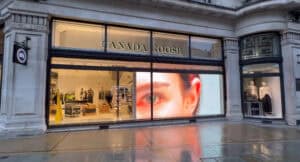
Horizontal viewing angle earns its keep anywhere the audience approaches from the side. The obvious case is a retail window display: most passers-by first see the screen at a shallow angle from along the pavement, not from directly in front. If the content only reads properly inside a narrow cone, the screen works for people already standing at the glass, the ones you least need to attract.
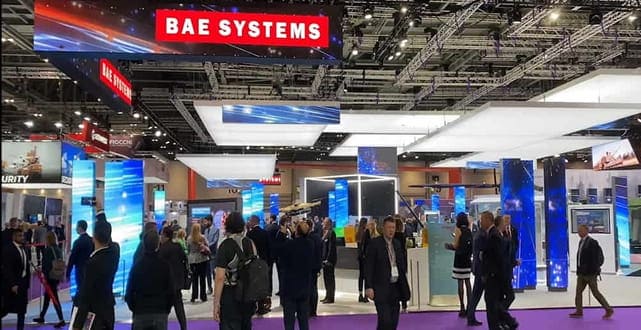
Wide, shallow rooms create the same geometry indoors. A reception screen in a broad lobby, or a sports bar display serving three seating zones, puts a large share of the audience 40–60° off-axis for their entire visit. Brightness usually survives that; legibility is the harder problem, because fine text that is comfortable head-on becomes harder work as the screen foreshortens and effective horizontal resolution compresses.
Pixel pitch feeds into the same decision. A tighter pitch such as our P2.5mm indoor LED display gives you resolution headroom, so content stays legible when foreshortening steals apparent width. Our pixel pitch guide covers how pitch, distance and content type fit together; the short version is that off-axis viewers effectively sit further away than their measured distance suggests, and the pitch choice should allow for it. Pitch does not, however, fix off-axis colour. That is set by package optics, not pixel density.
Curved and faceted screens are the other horizontal-angle case. A gently curved surface keeps more of it square to more of the room, which is often the honest engineering reason for curving a screen rather than the visual drama. Corner installs do the opposite: at the fold, viewers see one face on-axis and the other at a steep angle simultaneously, which is where colour shift becomes most visible.
If you are weighing up formats for a specific space, our LED video walls hub sets out the fixed-install options by pitch and application, and we are happy to sanity-check a floor plan before you commit to a screen size. Send us the room dimensions and we will come back with the geometry worked through.
Vertical angle: mounting height, tilt and louvres
Vertical viewing angle determines whether a screen mounted above head height still reads properly from directly beneath it. It is frequently narrower than the horizontal figure, particularly on louvred outdoor cabinets, and the usual fix is mechanical rather than electronic: a few degrees of downward tilt designed into the mounting steel. Three situations bring it into play.
High-mounted screens. A screen well above head height, whether over a concourse or on a building fascia, is viewed from below at a steep angle. If the vertical spec is narrow, viewers directly beneath get a dim, colour-shifted image. Tilting the screen a few degrees downward brings the audience back inside the usable viewing cone, and it is far cheaper to design the tilt into the bracket than to retrofit it.
Outdoor louvres. Many outdoor cabinets fit a small shading louvre above each row of LEDs to keep direct sunlight off the pixel face and preserve contrast. The louvre works by blocking light from above, which also blocks light going upward. The result is a deliberately asymmetric vertical angle: good downward and straight-on performance, reduced upward visibility. For a high-mounted screen viewed from below, the usual geometry for our DVO outdoor permanent range, that trade is exactly right. For a screen at ground level viewed from upper-floor windows opposite, it is not, and the spec needs checking before anyone signs off the location.
Stacked seating. Auditoria, tiered conference rooms and balcony sightlines put viewers above the screen centre line as well as below it. Here you want the honest vertical figure from the datasheet, not an assumption that it matches the horizontal one.
Colour shift: why the picture goes pink at the edges
Colour shift is the change in a screen’s perceived colour balance as you move off-axis, caused by the red, green and blue chips inside each SMD package shading one another at shallow angles. It typically becomes visible before the half-brightness limit, often from around 45° off-axis on standard SMD, so colour rather than brightness usually sets the usable viewing cone. It is the off-axis problem clients actually notice.
Inside a conventional SMD package, the red, green and blue chips sit side by side, a fraction of a millimetre apart. Viewed head-on, their output mixes evenly. Viewed from a shallow angle, the package walls and neighbouring chips begin to shade whichever die sits furthest from the viewer, so the mix changes, typically drifting warm from one side and cool from the other. Because the geometry is identical across every package, the whole screen shifts together, and a white background reads faintly pink or blue depending on where you stand.
Package construction sets how bad it gets. Standard SMD shows the effect most; black-face SMD packages improve contrast and moderate the shift; COB packages, where the bare chips are encapsulated directly on the board without individual package walls, hold colour noticeably better off-axis. That is one reason COB has gained ground in fine-pitch, close-viewing applications where people walk past the screen at every angle.
Processing and calibration can correct panel-to-panel colour variation. Brompton Technology and Novastar both build per-pixel calibration into their processing chains, and it is core to why a well-commissioned screen looks like one surface rather than a grid of cabinets. But calibration is measured with a camera positioned on-axis. It cannot make a single panel’s off-axis colour behaviour different from what the LED package physics allows. What good processing does ensure is that all panels shift together, so the image stays uniform even when it has drifted slightly warm from your seat. If you are sizing a processing chain, our Novastar processor calculator works through inputs and port counts.
The practical test costs nothing: at demo or site acceptance, view a full-white field, a mid-grey field and saturated red, green and blue fields from the worst realistic seat in the house, not the most flattering one. The RGB fields show you which channel is falling away; greys and faces show the shift more clearly than high-contrast demo footage ever will. If the client’s reception desk sits 70° off-axis from their new screen, that desk is where the screen should be judged.
Specifying for an off-axis audience
For fixed installations, this is a product-selection question before it is a calibration question. Our DFC series is the premium fixed-install range and the one we specify where off-axis colour behaviour is the deciding factor; the DX series covers mid-range fixed installs where budgets are tighter and the viewing geometry is more forgiving. A working rule: if a meaningful share of your audience sits beyond roughly 45–50° off-axis, or the content is white-heavy and viewed close, the case for DFC-grade product is easy to make; inside that cone, DX holds up well. Pitch, distance and audience position are the same inputs our LED screen configurator works through if you want a first pass at the numbers yourself.
Where a required seat falls outside the usable viewing cone, more brightness is rarely the answer, because it raises on-axis output without fixing colour balance at the side. Moving the screen, adding a few degrees of tilt, splitting content across two displays aimed at different zones, or introducing a shallow curve all attack the geometry directly.
The habits that hold up across projects: buy the vertical spec your mounting height demands, not the one the brochure leads with; treat colour shift, not brightness, as your limiting angle for white-heavy content; and judge every demo from the seats people will occupy.
From the field
The install that taught me to take vertical angle seriously was a screen above a retail unit’s shelving line, maybe four metres up. Head-on from the mezzanine it looked superb. From the shop floor directly beneath, where every customer stood, it was dim and drifting warm, because we were viewing it from forty-odd degrees below centre. A three-degree downward tilt in the bracket design would have solved it at the drawing stage. We rebuilt the mount, and since then I won’t sign off a survey until I’ve stood where the audience stands and looked up.
The other habit I’ve kept: on every demo, I put a plain white image up and walk the room in an arc. Head-on tells you what the panel can do. The walk tells you what the client will live with.
LED Screen Viewing Angle: Frequently Asked Questions
What is a good viewing angle for an LED screen?
Most quality indoor SMD product quotes 160° horizontal and vertical, which suits the majority of rooms. The better question is whether your audience geometry stresses the spec: wide shallow rooms, high mounting and shopfront approaches all push viewers off-axis. Judge the screen from your worst realistic viewing position rather than comparing headline numbers between datasheets.
How is LED screen viewing angle measured?
The quoted figure is the total arc within which the screen delivers at least half its head-on brightness. A 160° spec means 80° either side of the centre line. It is a brightness-only definition, so colour accuracy at angle is not captured by the number, which is why two screens with identical specs can look different from the side.
Why does an LED screen look pink or blue from the side?
Inside each SMD package the red, green and blue chips sit side by side, and at shallow angles they shade one another, changing the colour mix. The whole screen shifts together, so whites drift warm or cool depending on viewing side. COB and black-face packages reduce the effect; calibration keeps panels matched but cannot remove the underlying package behaviour.
Do outdoor LED screens have narrower viewing angles?
Often, and deliberately. Many outdoor cabinets fit shading louvres above each LED row to keep sunlight off the pixel face, which improves daytime contrast but restricts the upward vertical angle, sometimes to 60–90°. That trade suits a high-mounted screen viewed from below. Check the vertical spec carefully if your screen sits at ground level with viewers above it.
Does viewing angle affect which pixel pitch I need?
Indirectly, yes. Off-axis viewers see a foreshortened screen, so content effectively loses horizontal resolution from their position. If a meaningful share of your audience sits well off-centre, specifying a tighter pitch keeps text legible from those seats. Pitch does not improve off-axis colour, though; that is set by package optics, so evaluate the two separately.
Can calibration fix off-axis colour shift?
No. Camera-based calibration, whether through Brompton or Novastar processing, is measured on-axis and corrects panel-to-panel variation so the screen behaves as one uniform surface. It cannot change how an individual LED package mixes colour at an angle. What it guarantees is that any shift is uniform across the screen rather than patchy, which is what viewers notice most.
How should viewing angle be checked before purchase?
Calculate the extreme horizontal and vertical angles from the room drawings, then view the proposed module from those positions. Use full white, grey ramps, saturated RGB fields, faces and fine text rather than showreel footage, and test at the brightness level the screen will run at. For colour-critical work, agree the acceptance positions and criteria before manufacture.
Where viewing angle sits in your specification
Viewing angle is one of the quieter numbers on a datasheet, but it decides how much of your audience receives the image you are paying for. Read the horizontal and vertical figures separately, remember the quoted limit is a half-brightness point rather than a guarantee, and treat colour shift as the real constraint on white-heavy content. Get the geometry right at survey — audience positions, mounting height, tilt — and the LED screen viewing angle stops being a problem.
If you are planning a screen and want the viewing angles checked against real product data rather than brochure figures, call us on +44 (0)203 489 9878 or send the room details through our contact page and we will come back with a written recommendation covering pitch, product range and mounting angle for your space.