Skip to content

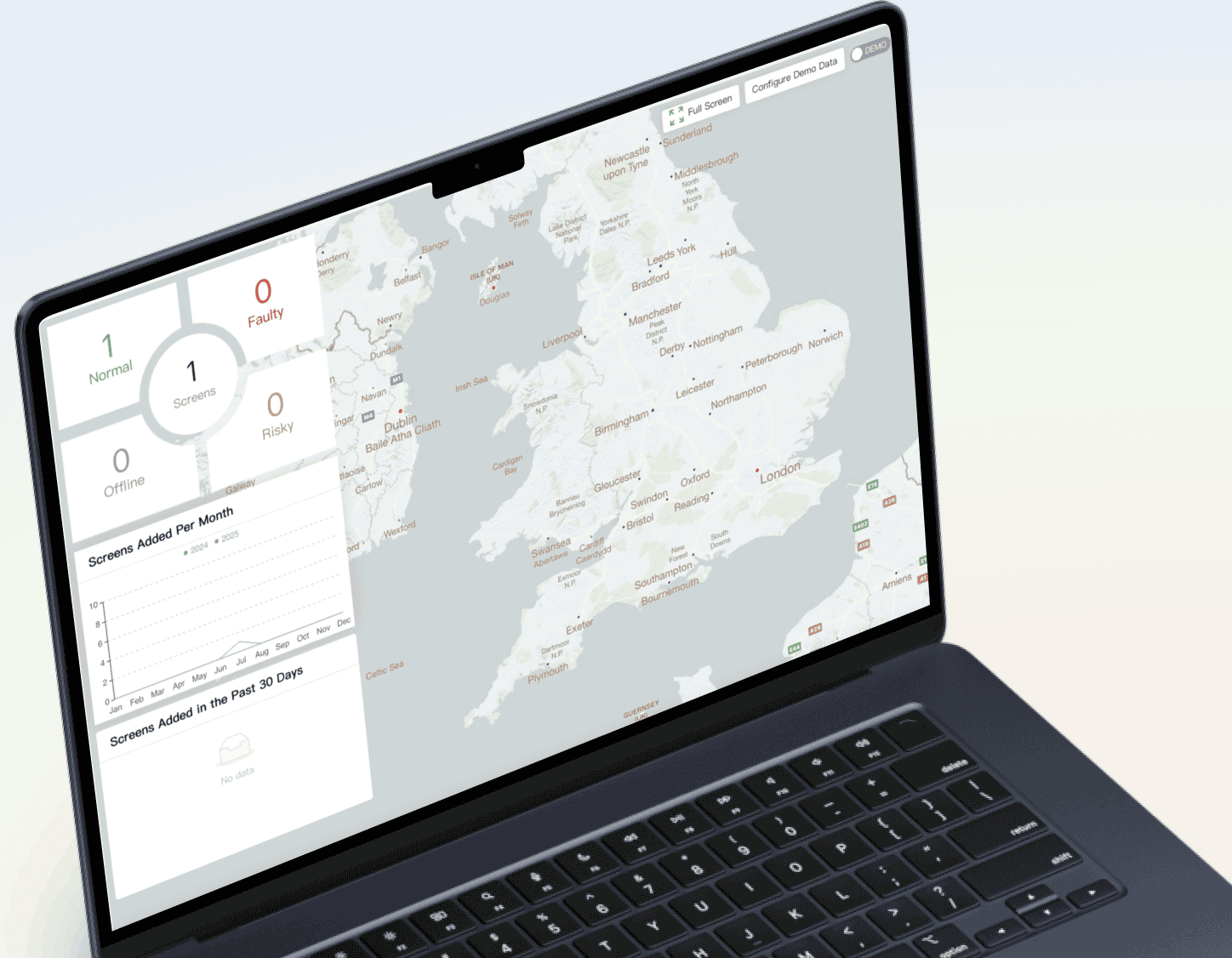
Modern LED display networks — from retail window walls to nationwide DOOH screens — now rely on cloud-managed control systems rather than on-site USB updates or local controllers.
NovaStar’s cloud ecosystem (commonly referred to as NovaStar Cloud or VNNOX) leads this shift, providing centralised control, remote diagnostics and scalable content management.
This guide explains, in detail, how NovaStar’s cloud platform works, what each device (TB, TU, VX, H-Series) actually supports, and how to design a secure, future-proof cloud architecture. Importantly, this article corrects a very common misconception:
VX controllers and H-Series processors do not support cloud content publishing — only TB/TU asynchronous players can publish content via VNNOX Standard/AD.
What Do We Mean by “NovaStar Cloud” and “NovaStar CMS”?
When we talk about NovaStar Cloud, we mean NovaStar’s cloud-hosted IoT management layer that sits above the LED hardware.
It includes VNNOX Standard/AD for content publishing and playlist scheduling, and VNNOX Care for monitoring, diagnostics and remote configuration.
Players, controllers and LED cabinets act as IoT edge devices, securely reporting status, sensor data, usage analytics and firmware versions back to the cloud and receiving commands in return.
NovaStar CMS (or “NovaStar cloud CMS”) usually refers to using VNNOX Standard/AD together with ViPlex clients as a full digital signage platform: you upload media, build timelines, centrally target specific screens or groups, and trigger emergency messages, while VNNOX Care keeps the underlying TB/TU players, VX controllers and H-Series processors healthy and up-to-date.
The building blocks: VNNOX, ViPlex, NovaLCT & friends
VNNOX is NovaStar’s cloud platform, which is split into two main services:
- VNNOX Standard / VNNOX AD (cloud CMS) – used for uploading media, scheduling playlists, campaign management, screen grouping and emergency override messaging. Only asynchronous players (TB Series, TU Series, VPlayer) can connect to VNNOX Standard/AD for cloud content publishing.
- VNNOX Care (monitoring & maintenance) – used for remote diagnostics, screen status and alarms, temperature/voltage monitoring, remote brightness control, receiving card firmware updates, and RCFGX configuration push & screen recovery. VX controllers and H‑Series processors are compatible with VNNOX Care, not VNNOX Standard/AD.
ViPlex Handy & ViPlex Express are the client applications (mobile and PC) used to create content, manage screens on the LAN, and bind players to the VNNOX cloud. They are also used for binding players to VNNOX, creating solutions locally, providing LAN-based control when cloud control is not required, and handling emergency or offline deployments.
NovaLCT is the low‑level LED configuration tool for sending cards, receiving cards and many controllers; still essential for cabinet mapping, calibration and on‑site commissioning. It provides detailed LED configuration, cabinet mapping and calibration, and sits alongside the cloud platform as the main commissioning tool.
V-Can / VMP / COEX are the higher‑end control software for VX controllers and COEX processors (MX / CX / KU series) used in demanding XR, broadcast and cinema‑grade environments. These tools handle layout switching and advanced video processor workflows in parallel with the cloud platform.
On the hardware side, the NovaStar cloud stack usually revolves around:
Taurus TB series multimedia players (TB30 / TB50 / TB60)
TU series playback control processors (TU15 Pro / TU20 Pro / TU4K Pro)
VX series all‑in‑one video controllers
H‑Series splicing processors (for very large or mission‑critical walls)
All of these can participate in a cloud‑managed LED ecosystem, even though they use different software components.
1.2 Core purpose of NovaStar cloud CMS
At its heart, the NovaStar cloud CMS is about:
Centralised content management – create, schedule and publish playlists (“solutions”) to one or thousands of screens.
Remote monitoring – live status of players, controllers, LED cabinets and sensors.
Remote configuration & firmware – push configuration files and firmware updates to players, receiving cards and controllers without travelling to site.
Role‑based access – control who can publish content, change configurations or acknowledge alarms.
Scalable architecture – support for everything from a single shopfront screen to nationwide DOOH (Digital Out‑Of‑Home) networks.
2. How NovaStar Cloud CMS Is Architected
2.1 High‑level architecture
A typical NovaStar cloud deployment looks like this:
Cloud layer (VNNOX)
VNNOX Standard / AD handle content management and scheduling.
VNNOX Care provides monitoring, diagnostics, remote control, and firmware/configuration operations.
Client layer (ViPlex & VPlayer)
ViPlex Handy (mobile) and ViPlex Express (Windows) are used to:
Design content and playlists
Bind devices (Taurus / TU / VPlayer) to VNNOX
Perform local LAN management and quick troubleshooting
VPlayer runs on Windows PCs for synchronous player use where a PC is effectively the “player”.
Device layer (players, controllers, processors)
Asynchronous endpoints (e.g. TB/TU players) pull content and commands from VNNOX over the Internet.
Synchronous endpoints (VX, H‑Series, COEX processors) are commissioned with NovaLCT/V-Can/VMP and monitored via VNNOX Care.
LED display layer
LED cabinets containing receiving cards (e.g. A10s Pro) and sensor inputs (brightness, temperature, humidity, ambient light).
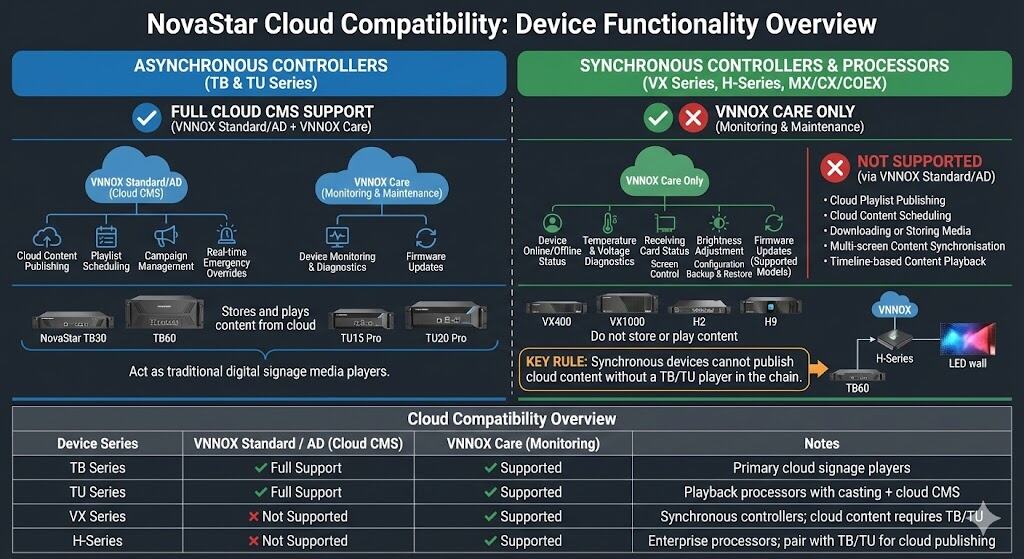
In NovaStar’s cloud ecosystem, only asynchronous controllers (TB/TU Series and VPlayer) can publish content directly to screens using VNNOX Standard or VNNOX AD.
Synchronous devices — such as VX controllers and H‑Series processors — do not act as cloud CMS endpoints. They can be monitored, diagnosed and updated via VNNOX Care, but they cannot download or play cloud‑scheduled content.
When full cloud signage functionality is required, synchronous devices are paired with a TB or TU player, which becomes the cloud‑connected endpoint while the VX or H‑Series handles real‑time video processing.
2.2 Data flows
A simplified flow for an asynchronous digital signage screen:
Designer creates a playlist in VNNOX Standard or AD.
Playlist is saved as a solution and scheduled (time, date, recurrence).
VNNOX instructs the bound Taurus or TU player to download the updated solution.
Player downloads media and timeline, validates checksums, then plays locally according to the schedule.
Player periodically reports status back to VNNOX Care – content version, online/offline state, health metrics, alarms.
For synchronous systems, the core video path is live through VX / COEX / H‑Series processors, but VNNOX Care still provides:
Remote monitoring (temperature, voltage, fan speeds, card status)
Brightness and on/off control
Configuration file delivery and firmware upgrade triggers
3. Key NovaStar Cloud‑Compatible Hardware
3.1 Taurus TB series multimedia players (TB30 / TB50 / TB60)

The Taurus TB series are compact, Android‑based media players designed for fixed installations in the “intelligent cloud era”.
Typical capabilities:
| Model | Max pixel load | Typical use case | Notes |
|---|---|---|---|
TB30 | ~650,000 pixels | Single shopfront, menu board, small to medium indoor screens | 1× main + 1× backup RJ45 LED output; Wi-Fi and optional 4G. |
TB50 | ~1.3 million pixels | Mid-size indoor LED, small outdoor totems | Greater load and more LED outputs than TB30. |
TB60 | ~2.3 million pixels | Large indoor walls, smaller outdoor billboards, pole screens | 4 LED outputs, higher decoding performance, optional 4G/5G. |
Core features across the TB range:
Android OS with hardware‑accelerated 4K decoding.
Local storage (e.g. 1–4 GB RAM / 16–32 GB flash depending on model).
Multiple networking options:
Wired Ethernet
Wi‑Fi AP, STA and AP+STA modes
Optional 4G/5G modules for remote or mobile LED applications.
Tight integration with VNNOX cloud CMS for remote publishing and monitoring.
TB series = full cloud CMS functionality: every TB model supports both VNNOX Standard/AD (cloud CMS) and VNNOX Care (monitoring & maintenance).
3.2 TU series playback control processors (TU15 Pro / TU20 Pro / TU4K Pro)
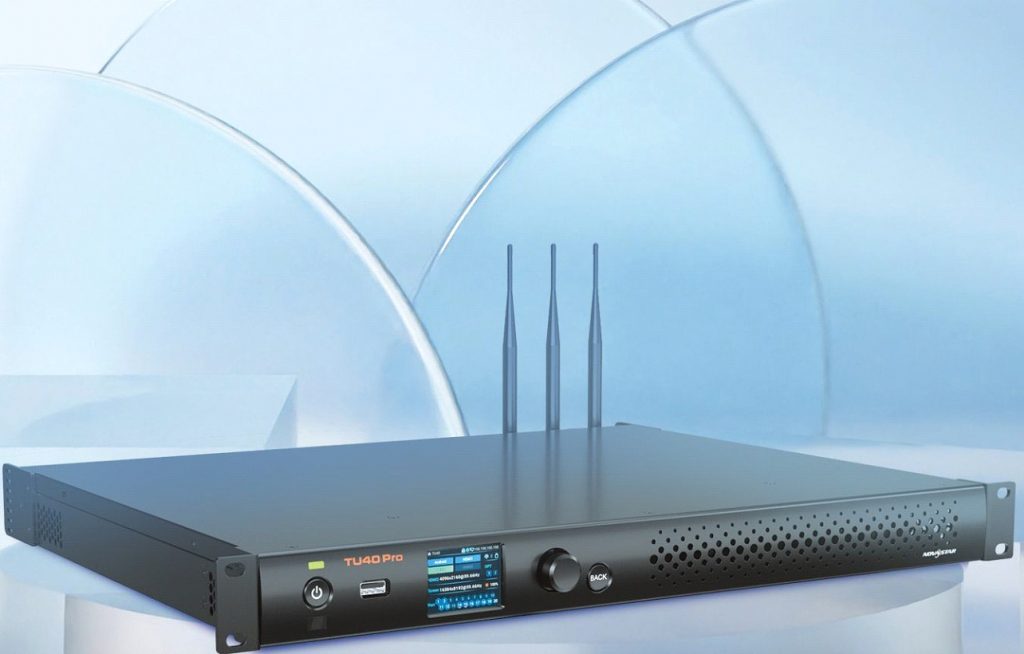
The TU series bridges the gap between media player and full broadcast controller. Think of them as intelligent Android-based playback processors with integrated sending card functions.
Approximate capacities:
| Model | Max pixels | Outputs | Typical scenario |
|---|---|---|---|
TU15 Pro | 2.6 million | 4× RJ45 | Single interactive LED wall, corporate reception, small studio |
TU20 Pro | 3.9 million | 6× RJ45 | Larger corporate walls, campus screens, immersive rooms |
TU4k Pro | 13 million | 20× RJ45 | Large fine-pitch or semi-immersive environments |
Shared characteristics:
Android 11/13 with support for third‑party apps (meeting platforms, custom signage apps, etc.).
Multiple HDMI inputs and USB ports for live sources plus media playback.
Wireless screen mirroring from Windows, macOS, iOS and Android devices – particularly useful in meeting rooms and collaborative spaces.
Control via ViPlex Handy and VNNOX Care for cloud‑linked operation.
TU series devices are full cloud CMS endpoints, supporting both VNNOX Standard/AD (for content publishing) and VNNOX Care (for monitoring and maintenance).
3.3 VX series all‑in‑one controllers (VX400 / VX600 / VX1000 / VX2000 Pro)

The VX series integrates video processing (scaling, switching, multi‑input) with LED sending output. These are typically front‑of‑rack devices in control rooms, live events and large fixed installations.
Key models and capacities:
| Model | Ethernet outputs | Max pixel load | Typical use |
|---|---|---|---|
VX400 | 4 | 2.6 million | Medium walls, small venues, retail feature walls |
VX600 | 6 | 3.9 million | Large walls, small arenas, hospitality venues |
VX1000 | 10 | 6.5 million | Stadia concourses, large auditoria, wide aspect walls |
VX2000 Pro | 20 | 13 million | Very large fine-pitch walls, multi-screen canvases |
VX controllers are usually:
Configured and calibrated in NovaLCT.
Driven day‑to‑day using V-Can or similar layout software.
Monitored and partially controlled via VNNOX Care for remote health, screen status and basic control.
3.4 H‑Series splicing processors
The H‑Series are modular splicing processors designed for huge, fine‑pitch LED video walls, control rooms and broadcast backdrops. A top‑end H20 can drive up to around 260 million pixels, depending on configuration. The H Series controllers are able to integrate with Taurus and TU series to allow remote content playback, monitoring and additional maintenance such as remote updates.
Key points:
Modular slot design with hot‑swappable input and output cards (HDMI 2.0, DP 1.2, SDI, NDI, IP, fibre).
Operates either as:
Pure splicing processor (feeding an external sending system), or
All‑in‑one processor + sending system.
Frequently paired with high‑end COEX/VMP workflows and HDR10 / HLG content.
3.5 Cloud Compatibility: What Each NovaStar Device Actually Supports
Not every NovaStar device interacts with the cloud in the same way. There is an important architectural difference between asynchronous and synchronous controllers, and this determines what each device can – and cannot – do via the cloud.
Asynchronous controllers – TB Series and TU Series
Synchronous controllers and processors – VX Series, H‑Series, MX/CX/COEX
In simple terms, the entire cloud compatibility question can be summarised by one rule:
✔ Asynchronous devices (TB/TU/VPlayer) = full cloud CMS support (VNNOX Standard/AD and VNNOX Care).
✔ Synchronous devices (VX/H‑Series/COEX) = VNNOX Care only (monitoring & maintenance).
✘ Synchronous devices cannot publish cloud content without a TB/TU player in the chain.
This is the single most misunderstood difference in the NovaStar ecosystem.
TB & TU Series – Full Cloud CMS Support (VNNOX Standard/AD + VNNOX Care)
The Taurus (TB) and TU players are the only NovaStar devices that support full cloud CMS publishing via VNNOX Standard/AD. They behave like traditional digital signage media players – they store and play content that is delivered over the cloud.
TB and TU players support:
Cloud content publishing
Playlist scheduling
Campaign management
Real‑time emergency overrides
All VNNOX Standard / VNNOX AD CMS features
They also appear in VNNOX Care for device monitoring, diagnostics and firmware updates.
VX Series – Monitoring Only (VNNOX Care Only)
The VX Series (VX400, VX600, VX1000, VX2000 Pro) are synchronous video controllers. They do not store or play content themselves, so they are not compatible with VNNOX Standard/AD CMS for playlist publishing.
Supported via VNNOX Care:
Device online/offline status
Temperature and voltage diagnostics
Receiving card status
Screen control (black / un‑black)
Brightness adjustment (supported setups)
Configuration backup and restore
Receiving card firmware updates (supported models)
Not supported:
Cloud playlist publishing
Cloud content scheduling
Downloading or storing media
Multi‑screen content synchronisation from VNNOX
Timeline‑based content playback
Summary: VX controllers participate in NovaStar Cloud only as monitored devices, not as cloud CMS endpoints. They require a separate TB/TU player if cloud content publishing is needed for that screen.
H‑Series – Enterprise Splicing, Cloud Monitoring Only
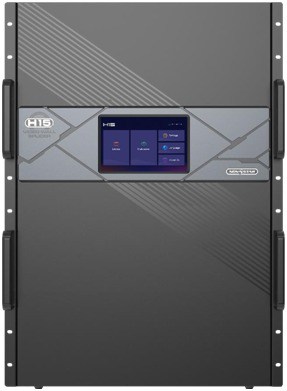
The H‑Series (H2, H5, H9, H15, H20) are ultra‑high‑end, modular splicing processors. They handle massive real‑time video workloads but do not function as cloud signage media players.
Supported via VNNOX Care:
Device monitoring
Health diagnostics
Remote configuration file pushes
Firmware updates (model‑dependent)
Not supported natively:
Cloud content publishing
Cloud playlist scheduling
Media storage
Asynchronous playback
H‑Series Cloud Content Control Requires a TB/TU Player
If you want an H‑Series‑driven LED wall to be cloud‑managed for signage:
The H‑Series remains the video processing backbone.
A TB60 or TU20 Pro is added as the cloud content endpoint.
The TB/TU handles asynchronous content, scheduling and emergency overrides.
The H‑Series continues handling scaling, splicing and signal routing to the LED wall.
Summary: H‑Series processors integrate with the cloud for monitoring but cannot publish or schedule content without a TB/TU player in the chain.
Cloud Compatibility Overview
| Device Series | VNNOX Standard / AD (Cloud CMS) | VNNOX Care (Monitoring) | Notes |
|---|---|---|---|
| TB Series | ✔ Full Support | ✔ Supported | Primary cloud signage players |
| TU Series | ✔ Full Support | ✔ Supported | Playback processors with casting + cloud CMS |
| VX Series | ✘ Not Supported | ✔ Supported | Synchronous controllers; cloud content requires TB/TU |
| H-Series | ✘ Not Supported | ✔ Supported | Enterprise processors; pair with TB/TU for cloud publishing |
4. Cloud CMS Features in Detail
4.1 Content creation and publishing (VNNOX Standard / AD + ViPlex)
NovaStar’s content model uses three main layers: media → playlists → solutions.
Typical workflow:
Upload media (video, images, text, HTML) to VNNOX.
Create playlists – arrange media in order, set durations, transitions and audio.
Create solutions by assigning playlists to:
Specific screens or screen groups.
Time‑based schedules (date ranges, weekly patterns, time‑of‑day).
Publish – VNNOX pushes instructions to bound players; players download and play the solution locally.
You can do lighter‑weight publishing directly from ViPlex Express/Handy on a LAN, with later synchronisation to VNNOX, or build everything in the cloud UI from day one.
Feature highlights:
Timeline‑based editors for complex, multi‑layer layouts.
Expiry dates for campaigns and promotions.
Support for multi‑screen canvases (e.g. a single creative stretched across several TB/TU players).
Emergency override – push a “high‑priority” solution to override normal playlists in emergencies.
4.2 Real‑time monitoring and alarms (VNNOX Care)
VNNOX Care is the operations dashboard for NovaStar cloud deployments. From a single browser interface you can:
See all screens on a map or list.
View per‑device status:
Online/offline
Receiving card state
Controller details
Player software versions
Perform screen control:
Normal display vs enforced black screen (e.g. for overnight shutdown).
Brightness adjustment (absolute or percentage).
Send configuration files to screens.
Recover screens from cloud‑stored configuration backups.
Initiate upgrades of:
Receiving cards (e.g. A10s Pro)
Controllers (VX, synchronous senders, some COEX models)
VNNOX Care also supports grouping, so you can create logical bundles like:
“UK Retail – Window Screens”
“Rail – Platform Passenger Information”
“Stadium – Pitchside Ribbon”
…and apply operations to the entire group.
4.3 Cloud‑based firmware and configuration management
NovaStar cloud supports several layers of remote firmware/config management:
4.3.1 Upgrading terminal players (Taurus / TU)
Within VNNOX Standard / VNNOX Lite, you can remotely upgrade the software running on terminal players(Taurus/TU/VPlayer):
From the VNNOX dashboard, go to Players or Screens.
Initiate an Upgrade operation against one or more players.
Choose the appropriate upgrade package (usually pre‑loaded in the cloud from official NovaStar firmware).
VNNOX pushes the update; you monitor progress in the same interface.
This is typically used to:
Fix bugs or stability issues.
Add new CMS features or codec support.
Standardise software versions across a fleet.
4.3.2 Upgrading receiving cards and controllers (VNNOX Care)
VNNOX Care exposes specific controls for receiving card and controller upgrades:
Upgrade Receiving Card
Upload the receiving card firmware to Personal Files or Program Packages in VNNOX Care.
Select the target screen(s) in the My Screens view.
Choose Upgrade Receiving Card.
Select the firmware package and whether to apply to all cards or selected ones.
Confirm and monitor status until complete.
Upgrade Controller
Select the controller from the monitoring view.
Choose Upgrade Controller.
Pick the target firmware version from available options.
Confirm and monitor progress.
The same interface allows you to:
Send configuration files (e.g. RCFGX from NovaLCT).
Recover a screen using a backup configuration stored in the cloud.
This dramatically reduces the need for on‑site upgrades, especially on large or hard‑to‑reach installations.
4.3.3 Local firmware upgrades via NovaLCT and V-Can
Even with cloud tools, NovaLCT remains the reference method for firmware upgrades on many sending and receiving cards:
Log into NovaLCT with advanced permissions.
Import the correct firmware file.
Use the firmware upgrade tool to push updates to sending and receiving cards, either globally or selectively.
For VX series, V-Can can be required for certain firmware updates and advanced functions, particularly on newer VX Pro models.
Best practice is often:
Use NovaLCT / V-Can for initial commissioning and complex updates.
Use VNNOX Care thereafter for routine, rolled‑out upgrades and configuration changes.
5. Security, Permissions and Compliance Considerations
5.1 Roles and permissions
NovaStar cloud supports multi‑role operation:
System Admin – full control over accounts, players, solutions and system settings.
Content Admin / Editor – can create and publish content, but not alter system‑wide settings.
Operator / Technician – can respond to alarms, perform remote resets, adjust brightness and run diagnostics, but not edit content.
VNNOX includes player authentication information to prevent unauthorised terminals from binding to your account; best practice is to change default credentials and keep them strictly controlled.
5.2 Encryption and secure transport
Data between VNNOX cloud and devices is transported over encrypted channels (HTTPS/TLS at the application layer plus device‑level protocols). While NovaStar does not publish exhaustive cryptographic implementation details publicly, the design assumption is that all management traffic between cloud and devices is secured.
From an organisational point of view, you should still:
Place players and controllers on a segmented network (e.g. VLAN) with restricted access.
Use a VPN or secure management network for NovaLCT/V-Can where direct IP access is required.
Put strong passwords and, where available, two‑factor authentication on cloud accounts.
If you are building your own private cloud or integrating NovaStar cloud into a wider digital platform, aligning your security controls with ISO/IEC 27001 is a sensible benchmark for information security management.
6. Connectivity and Network Design
6.1 Supported network types
Most NovaStar cloud deployments will use some mix of:
LAN / WAN (Ethernet)
Primary choice for fixed indoor/outdoor installations.
Offers highest reliability and bandwidth.
Wi‑Fi (2.4 GHz / 5 GHz)
Useful in retail or corporate spaces where cabling is impractical.
TB and TU series support AP, STA and AP+STA for flexible topologies.
4G / 5G cellular
Ideal for:
Mobile LED trailers.
Lamp‑post / pole screens.
Rural or hard‑to‑reach roadside DOOH.
6.2 Time synchronisation
Precise time synchronisation is critical for:
Frame‑aligned synchronous playback across multiple players.
Accurate scheduling and logging.
NovaStar systems make heavy use of NTP (Network Time Protocol) to keep devices aligned.
Best practice:
Provide a reliable NTP source (public or corporate).
Ensure all TB/TU players and controllers are set to the correct time zone and NTP source via ViPlex or NovaLCT.
For touring or XR environments, use dedicated genlock and frame‑sync features in VX/COEX/H‑Series to keep cameras and LED in lock‑step.
6.3 Third‑party control (RS‑232, Ethernet APIs)
NovaStar kit plays well with building control and show‑control systems (Crestron, AMX, Q‑Sys, etc.) via:
RS‑232 – for legacy control or when a controller is not on the main IP network.
Ethernet APIs (TCP/UDP, HTTP‑based) – increasingly used with COEX and VX controllers (often documented via NovaStar’s API manuals).
Common scripts include:
Turn all LED walls to black screen at end of day.
Switch controller presets (e.g. from “sports mode” to “corporate event mode”).
Change brightness based on BMS‑reported ambient conditions.
7. Applications: Where NovaStar Cloud CMS Excels
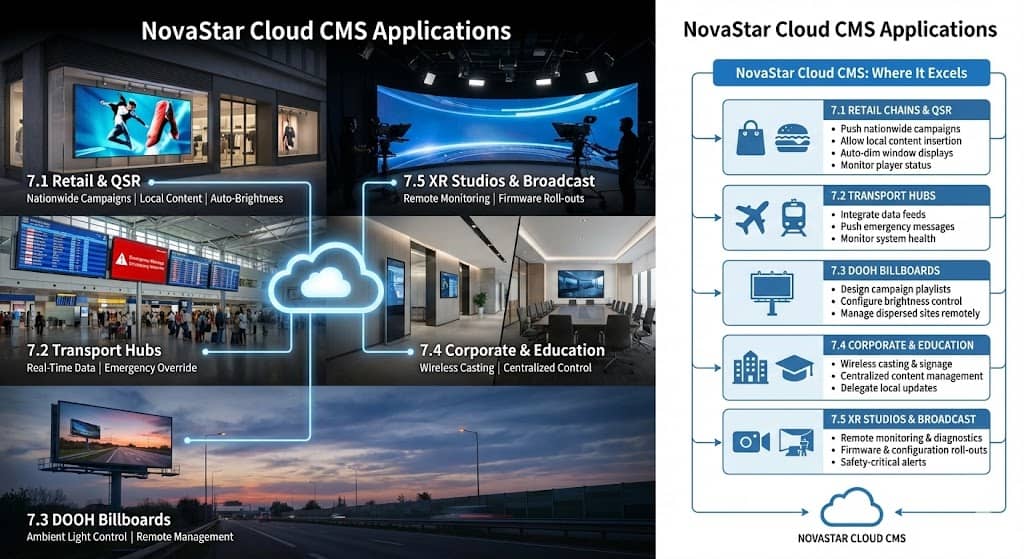
7.1 Retail chains and QSR (Quick Service Restaurants)
Use NovaStar cloud to:
Push nationwide campaigns from head office.
Allow local managers to insert store‑specific content in reserved timeline slots.
Automatically dim window‑facing LED walls in the evening while keeping in‑store displays brighter.
Monitor player status and receive alerts if a shopfront screen goes down before trading hours.
Brightness guidelines for window and outdoor signage often fall in the 1,000–4,000+ nit range depending on ambient light, and NovaStar’s brightness automation helps stay within these targets while controlling power usage.
7.2 Transport hubs (airports, rail, metro)
Typical setups:
Taurus / TU players at each display cluster.
Integration with flight or train data feeds to drive real‑time content.
VNNOX‑driven emergency override to push safety or evacuation messages to specific zones.
Control rooms can use H‑Series or COEX processors to drive large situational awareness walls with HDR‑capable video, while VNNOX Care keeps tabs on temperatures, voltages and card status.
7.3 DOOH billboards and street furniture
For outdoor DOOH:
Use TB60 or suitable TU models with 4G/5G and light sensors.
Design playlists in VNNOX AD to match campaign requirements (flight dates, time‑of‑day slots).
Configure ambient light‑based brightness control to meet local regulations and good‑neighbour policies (e.g. night‑time brightness significantly reduced).
Cloud management is especially valuable when sites are dispersed across cities or motorways, where truck‑rolls are expensive and slow.
7.4 Corporate and education campuses
For corporate campuses and universities:
Use TU20 Pro in boardrooms, auditoria and lecture theatres for wireless casting plus signage.
Use Taurus players on wayfinding and reception screens.
Manage content centrally via VNNOX, but delegate local content updates to site communication teams with restricted permissions.
7.5 XR studios, virtual production and broadcast
In XR and broadcast:
COEX processors (MX / CX / KU) or H‑Series are usually the main “brains” behind the LED volume, often paired with A10s Pro receiving cards for advanced HDR, frame‑rate and dynamic image features.
VNNOX Care is used primarily for:
Remote monitoring and fault diagnosis.
Firmware and configuration roll‑outs.
Safety‑critical status alerts (e.g. temperature spikes).
Content itself is often driven from media servers (Disguise, Resolume, etc.), but NovaStar’s cloud tools still provide operational oversight.
8. Reliability, Redundancy and A10s‑Class Receiving Cards
8.1 Built‑in redundancy
NovaStar hardware provides multiple layers of redundancy:
Dual power supplies on many enterprise‑grade controllers and processors.
Signal redundancy:
Primary + backup RJ45 lines cascaded through cabinets.
Loop redundancy where the signal path is closed, allowing traffic to re‑route on failure.
Data redundancy in receiving cards:
The A10s Pro and related Armor series cards can store configuration and calibration data redundantly and support dual‑card backup. If one card fails, the other takes over while maintaining image integrity.
8.2 Why this matters in a cloud context
Cloud management makes it easier to:
Detect issues early (e.g. VNNOX Care alarm when a card overheats).
Trigger controlled fail‑over or black screen on a faulty segment.
Roll out firmware that improves stability or fixes known bugs across the fleet.
But redundancy still needs to be planned at the design stage:
Provide backup network paths (dual switches, diverse routing where budgets allow).
Specify dual‑card backup in cabinet design where uptime is critical.
Standardise on a small set of firmware versions across the estate to simplify support.
9. How to Choose the Right NovaStar Cloud Stack
9.1 Key questions to answer
Before choosing specific NovaStar hardware and cloud licences, clarify:
Total pixel count per screen and across the network.
Number of screens and how they’re grouped (single site vs multi‑site, national vs regional).
Content type:
Simple loops of adverts?
Live video + graphics?
HDR, 4K/8K, XR, camera‑tracked content?
Installation type:
Fixed installation vs touring/rental.
Indoor vs outdoor; brightness requirements.
Connectivity model:
Always‑on Ethernet?
Unreliable mobile data?
Strict firewall constraints?
Integration needs:
Third‑party control systems.
Data feeds (transport, weather, business metrics).
Existing CMS or DAM (Digital Asset Management) platforms.
9.2 Quick selection guide (practical recommendations)
These are illustrative patterns – Dynamo will always design to your specific project.
Small single‑screen signage (cafés, reception, independent retail)
Hardware: TB30 or TB50
Cloud: VNNOX Standard + VNNOX Care
Why: Simple to deploy, enough pixel load, low complexity.
Multi‑site retail chains & QSR
Hardware: TB60 (or mixed TB30/TB60) per screen/cluster
Cloud: VNNOX AD for campaign management + VNNOX Care
Why: Scales well across dozens/hundreds of sites; strong scheduling and monitoring tools.
Corporate flagship walls & collaborative spaces
Hardware: TU20 Pro for interactive spaces; VX600 or VX1000 for lobby hero walls
Cloud: VNNOX Standard/AD + VNNOX Care
Why: TU20 Pro handles casting and signage; VX handles complex input mixes.
Large 4K+ LED walls (stadia, arenas, venues)
Hardware: VX1000 / VX2000 Pro or H‑Series depending on pixel count
Cloud: VNNOX Care + NovaLCT/V-Can for detailed config
Why: High pixel capacity, multi‑input switching, low‑latency and redundancy options.
XR volume or broadcast backdrop
Hardware: COEX (MX/CX/KU series) with A10s Pro receiving cards and, where appropriate, H‑Series splicers.
Cloud: VNNOX Care + COEX VMP for design/monitoring
Why: Advanced HDR, frame multiplication, camera‑sync tools, and high‑precision calibration.
10. Implementation Checklist
10.1 Planning and design
Confirm content strategy (what will play, how often, who owns it).
Calculate pixel counts per screen and choose appropriate controllers/players.
Define connectivity for each site (Ethernet/Wi‑Fi/4G or a mix).
Plan redundancy:
Dual power if needed.
Primary + backup data paths where justified.
Dual‑card receiving backups on critical walls.
Agree on a firmware policy (approved firmware builds, change control).
Design brightness strategy with ambient sensors and local regulations in mind.
10.2 Commissioning
Configure cabinets and receiving cards in NovaLCT (mapping, calibration, brightness/gamma).
Bind TB/TU players to VNNOX using ViPlex Express/Handy.
Enrol controllers and screens into VNNOX Care and verify status.
Create and test initial content solutions in VNNOX Standard/AD.
Test scheduled and emergency override behaviour.
10.3 Handover and operations
Define user roles in VNNOX (admins, editors, operators).
Document standard operating procedures for:
Content publishing.
Brightness changes.
Emergency messaging.
Firmware and configuration changes.
Set up automated alerts for offline screens and critical alarms.
Schedule periodic reviews of performance, alarms and firmware levels.
11. From the field – how we deploy NovaStar cloud (by Daniel Reynolds)
“One of the biggest shifts I’ve seen over the last decade is how expectations around uptime have changed. If a high‑street LED window wall goes dark now, it’s not just an inconvenience – the brand expects us to know about it before they do.”
In practice, when we roll out a NovaStar cloud solution at Dynamo, the most valuable time is spent before a single screen is installed. We work with clients to define:
How they want to segment their estate (by region, brand, or format).
What their internal teams should be able to do themselves in VNNOX (e.g. updating local menus) versus what stays with IT or with Dynamo (e.g. firmware rollout or structural changes).
What constitutes a “critical” alarm – for some clients it’s any offline screen; for others it’s only flagship locations.
We then standardise the firmware, cabinet configurations and naming conventions across every site. It feels slightly obsessive, but it means that when something does go wrong – at 9am on a Saturday with a queue round the block – we can usually diagnose and remediate it remotely instead of sending someone across the city.
12. Working with Dynamo LED Displays
Dynamo LED Displays designs, supplies and maintains cloud‑managed NovaStar systems across the UK and internationally, from fine‑pitch indoor walls to outdoor DOOH and specialist environments.
We can help you:
Specify the right combination of TB/TU/VX/H‑Series hardware for your project.
Design resilient network architectures for cloud management.
Commission cabinets, receiving cards and processors for optimal image quality.
Set up Novastar cloud CMS, VNNOX Standard/AD and VNNOX Care, including roles, alerts and workflows.
Provide ongoing support contracts with agreed response times.
13. Next steps
If you’re planning a new LED project, or want to migrate an existing estate to a NovaStar cloud CMS:
Call +44 (0)203 489 9878
Visit us at 146a Brick Lane, London, E1 6RU or our Oxfordshire office in RG8 0RR
Or use the contact form on our site to outline your project and we’ll arrange a technical consultation.
Dynamo can design the complete solution – LED hardware, NovaStar control and cloud management – so your team gets a powerful, manageable digital canvas rather than a collection of isolated screens.
FAQS
1. What is NovaStar cloud CMS?
NovaStar cloud CMS is a collection of cloud tools – mainly VNNOX Standard/AD for content and VNNOX Care for monitoring and maintenance – used to publish content, schedule playlists and remotely manage LED displays and controllers across multiple sites.
2. What is the difference between VNNOX and ViPlex?
VNNOX is the cloud platform that lives on NovaStar’s servers (or a private cloud), while ViPlex Handy and ViPlex Express are client applications installed on phones or PCs. ViPlex is typically used to bind devices, design layouts and manage screens on a LAN, and VNNOX handles centralised cloud publishing and fleet‑wide management.
3. Which NovaStar hardware works with the cloud CMS?
Taurus TB series players (TB30, TB50, TB60), TU series playback processors (TU15 Pro, TU20 Pro, TU4K Pro), many VX controllers, and H‑Series splicing processors can all be integrated into a NovaStar cloud deployment. Only TB/TU/VPlayer asynchronous devices support VNNOX Standard/AD for content publishing; VX and H‑Series participate via VNNOX Care for monitoring and maintenance.
4. Can NovaStar cloud update firmware remotely?
Yes. VNNOX Standard can upgrade terminal players (Taurus, TU, VPlayer), and VNNOX Care can upgrade receiving cards and supported controllers, as well as push configuration files and recover screens from cloud‑stored backups. For more complex scenarios, NovaLCT and V‑Can are still used, often accessed via VPN.
5. Do I need internet access for every LED screen?
For cloud control, each player or controller needs a reliable path to the VNNOX servers – typically via wired Ethernet, Wi‑Fi or 4G/5G. If internet connectivity is not possible, you can still use local ViPlex or USB‑based workflows, but you lose the main benefits of centralised cloud control.
6. Is NovaStar cloud suitable for mission‑critical control rooms or XR stages?
Yes, provided the system is designed correctly. H‑Series or COEX processors handle the real‑time video path, while VNNOX Care provides monitoring, remote diagnostics and controlled firmware/configuration roll‑outs. Redundant power, dual data paths and A10s‑class receiving cards are recommended for high‑availability deployments.
7. How many screens can I manage from NovaStar cloud?
NovaStar designs VNNOX to scale to very large estates – marketing material references one operator managing up to 1,000 screens – but the practical limit depends on network quality, content complexity and your operational processes. For national roll‑outs, grouping and role‑based permissions become essential.
8. How can Dynamo help with NovaStar CMS projects?
Dynamo LED Displays can design the complete solution – specifying TB/TU/VX/H hardware, commissioning NovaLCT configurations, setting up VNNOX roles and alarms, and providing ongoing support. We can work with your IT and marketing teams to ensure the system is secure, maintainable and easy to use day‑to‑day.
- Written by Daniel Reynolds, Managing Director at Dynamo LED Displays, who has deployed NovaStar control systems across architectural, live event, retail, DOOH and broadcast projects.