Specifiers usually leave the CMS decision until last, and it is often the first thing to cause problems after handover. The LED CMS cloud vs on-prem question rarely comes down to the software itself. It comes down to who updates the content, where the screen sits on the network, and what the IT department will actually allow. We install fixed and rental LED across retail, corporate, broadcast and outdoor sites in the UK, and the content management conversation goes differently in every one of those sectors. This guide sets out how the two models work, where each one fits, and the questions to settle before you commit. For the display hardware itself, our guide to LED displays covers types and use cases.
Key takeaways
- An on-prem LED CMS runs on hardware inside your network; a cloud LED CMS is hosted externally and managed through a browser. The screen hardware is the same either way.
- Cloud suits multi-site estates, marketing-led content teams and frequent scheduling changes. On-prem suits air-gapped sites, broadcast environments and IT departments with strict outbound-traffic policies.
- The software decision is downstream of the security decision. Settle the network policy before you shortlist platforms.
- The LED processor (Brompton, Novastar) sits below the CMS and is a separate decision. A cloud CMS does not remove the need for proper processing.
- Recurring licence fees are the main cost difference: cloud is typically a SaaS subscription per screen or per player, while on-prem is usually a larger one-off cost plus maintenance.
- Bandwidth planning matters: one 300 MB campaign file is easy, but 200 players pulling it at 09:00 will saturate the link.
- Hybrid deployments, with cloud scheduling and local playback, cover most of the failure cases people worry about with either pure model.
At a glance: LED CMS cloud vs on-prem
| Factor | On-prem CMS | Cloud CMS |
|---|---|---|
| Where it runs | Server or player on your local network | Vendor-hosted, accessed via browser |
| Who manages updates | Your IT team | The CMS vendor |
| Remote content changes | Only via VPN or remote desktop | From any authenticated browser |
| Multi-site estates | Each site managed separately (or via WAN) | Single dashboard for the whole estate |
| Internet dependency | None for playback or scheduling | Needed for scheduling; playback usually cached locally |
| Typical cost model | One-off licence + support contract | Monthly or annual subscription per screen |
| Common sectors | Broadcast, control rooms, secure corporate, finance | Retail, hospitality, DOOH, multi-site corporate |
| IT security posture | Data stays inside the network | Requires outbound connection and vendor vetting |
What an LED CMS actually does (and what it doesn’t)
An LED CMS handles scheduling, playlists, media storage, user permissions and, on larger estates, remote monitoring of player health. In the wider industry it is often called a digital signage CMS, and it is the layer your marketing team touches. It is not the layer that drives the pixels. You can see how we approach that workflow layer on our content management page.
Below the LED CMS sits the LED processor. On fixed installs we typically specify Novastar processing, and on rental and broadcast work Brompton is common; both companies publish detailed technical documentation on their processing ranges (Novastar and Brompton Technology). The processor handles scaling, colour management, frame rate and the physical drive to the receiving cards in each cabinet. The CMS pushes content to a player; the player outputs to the processor; the processor drives the wall.
This separation matters for the cloud vs on-prem decision because it means the choice is about the content pipeline, not the display. A DFC Series fine-pitch boardroom wall and a DVO Series outdoor screen can both run from a cloud LED CMS or an on-prem one. Nothing about the panel technology forces your hand. You can compare the panel ranges themselves on our LED display products page. Pitch, brightness and environment drive that decision, and the CMS layers on top.
The other thing an LED CMS does not do is fix bad content workflow. If nobody owns the screen after handover, it will show the same welcome loop in three years’ time regardless of where the software is hosted.
When on-prem is the right call
On-prem means the CMS server and media storage live inside your network, usually on a dedicated machine near the screen or in the comms room. Nothing leaves the building, your IT team manages it, and remote changes require a VPN. Four situations push a project towards this model.
Air-gapped and secure environments
Finance trading floors, defence sites, some government buildings and certain broadcast facilities do not permit screen infrastructure to hold an outbound internet connection. For these sites the cloud conversation is over before it starts. It is their network policy, not the AV specification, that decides the model.
Broadcast and live production
Studio LED walls are driven by production playout systems, media servers and vision mixers rather than a scheduling-led LED CMS. Content changes happen in the gallery, in real time, on local infrastructure, and the wall has to hold genlock with the camera chain, which is a processing and sync question, not a scheduling one. A cloud layer adds nothing here and introduces a dependency nobody wants during a live transmission.
Sites with unreliable connectivity
Most cloud platforms cache content locally so playback survives an outage, but scheduling changes and monitoring do not. If the site has genuinely poor connectivity, as with some industrial units, basements and temporary structures, a locally managed system removes the frustration.
Latency-critical interactive work
Where a screen responds to sensors, cameras or live data feeds in real time, the processing loop needs to be local. Our apps, sensors and software development work almost always runs on local hardware for exactly this reason, even when day-to-day scheduling sits in the cloud.
The trade-offs are real. On-prem means your IT team owns patching, backups and the server hardware lifecycle. If the CMS server sits in a cupboard and nobody updates it for three years, the “local control” benefit starts to weaken. Remote content changes need a VPN, and multi-site estates become multi-system estates unless you build WAN links between them.
When cloud is the right call
Cloud means the LED CMS is hosted by the vendor and your team logs in through a browser. A small player device at each screen pulls content down and caches it locally. We are platform-agnostic on the software: Novastar’s own VNNOX cloud platform pairs naturally with its processing on fixed installs, and we integrate with whichever platform a client’s estate already runs.
Multi-site estates. This is where cloud earns its subscription. A retail chain with forty screens across thirty stores manages the lot from one dashboard: push a national campaign to everything, override one store for a local event, and see at a glance which players are online. Doing that with forty on-prem systems is a full-time job.
Marketing-led content teams. If the people changing content sit in a marketing department rather than an AV or IT team, a browser-based tool with user roles and approval workflows fits how they already work. Nobody has to be taught to remote-desktop into a signage server.
Small teams without dedicated IT. The vendor handles updates, security patching and backups, which means nobody in-house has to patch or back anything up. For a hospitality venue or an independent retailer with one screen, that matters.
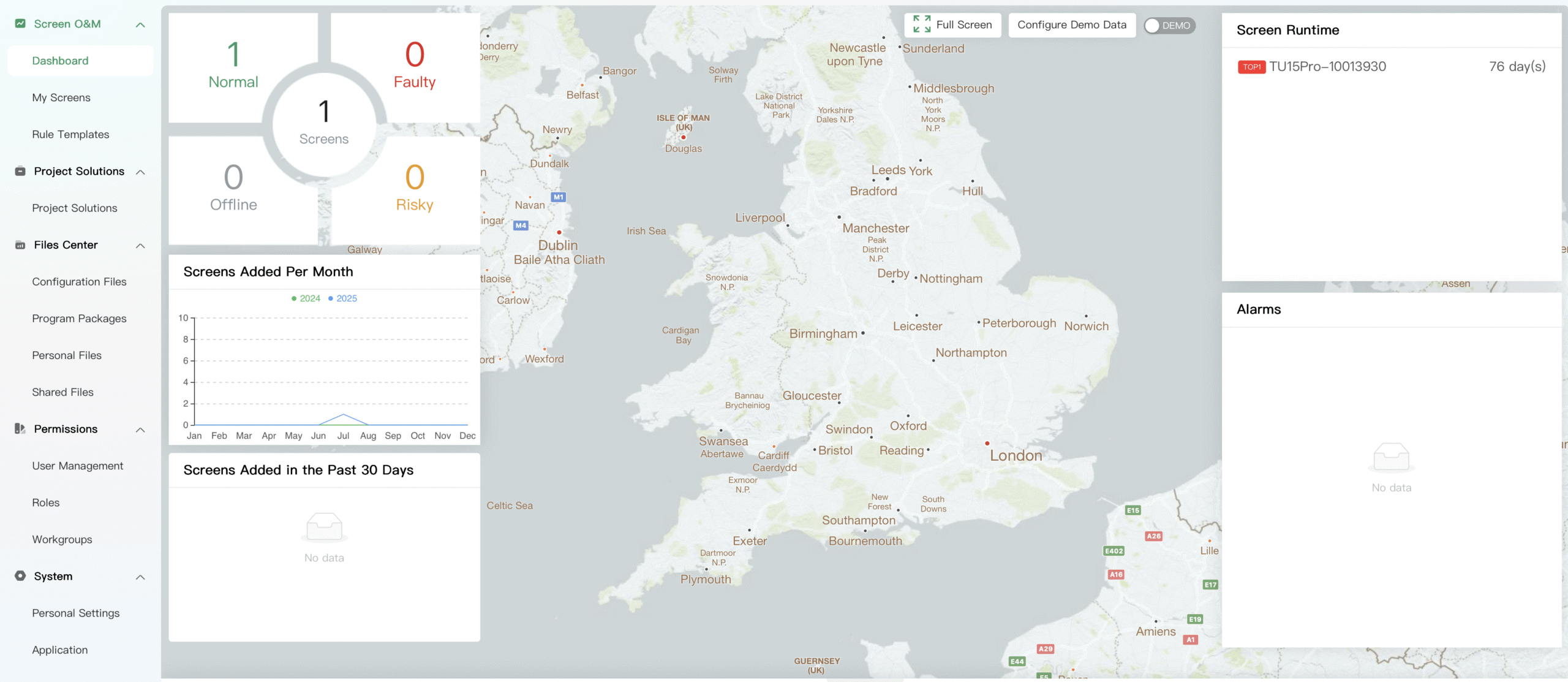
Monitoring and proof of play. Cloud platforms report player uptime, playback logs and screenshot confirmation without any infrastructure on your side. For advertising-funded screens, proof-of-play reporting is usually a contractual requirement, and it is far easier delivered from a hosted platform.
The trade-offs: an ongoing SaaS subscription per screen, a dependency on the vendor’s business continuing to exist, and a requirement to get the platform through your IT security review.
If you want to talk through scheduling, approvals and playback control for a specific project, our content management page explains how we approach the workflow side across LED installations. It is the right starting point before any platform shortlist.
The details that decide it: security, bandwidth and permissions
Three practical factors settle most LED CMS cloud vs on-prem decisions before any feature comparison: whether your network policy permits an outbound connection, whether the network can move large media files to every player, and who is allowed to change what. Get these three answered and the platform shortlist usually writes itself.
Security review
In our experience of corporate installs, the security review is where CMS shortlists stall more often than anywhere else. A cloud player needs an outbound connection from your network to the vendor’s servers. IT departments will reasonably ask: what data leaves the network, which ports and domains does the player talk to, where is the media hosted, who has admin access, and what happens if the vendor is breached? Good cloud vendors answer with documentation: ISO 27001 or SOC 2 certification, published domain allowlists, single sign-on support. Weak ones say “it just needs internet access”, which is where projects stall for months. The UK’s National Cyber Security Centre publishes practical cloud security guidance that most IT teams will already be working to. Note that on-prem is not secure by default either: a signage server still needs a patching policy, backups and a named administrator.
Bandwidth
LED walls use large files because the canvas is wide, bright and viewed close. A 30-second 3840 × 2160 clip encoded at 50 Mbps is roughly 190 MB. Multiply that by fifty players and content distribution becomes a network event, not a casual upload. A cloud LED CMS should support scheduled overnight downloads, local caching and content expiry; an on-prem system should sit on a network segment that can move files without disrupting other services.
Permissions
This is where many CMS projects succeed or fail. A sensible role structure separates system administrator, content approver, content uploader, local scheduler and read-only support user. Avoid shared logins. They make audit trails weak and support conversations harder. Cloud platforms usually make role-based workflows easier; on-prem systems can do it, but the admin effort varies.
If you are still working out the screen specification alongside the software decision, our pixel pitch guide is the place to start. Pitch, viewing distance and resolution shape the content requirements, and the content requirements shape which CMS features actually matter.
Hybrid: what most estates actually end up with
A hybrid LED CMS deployment combines cloud scheduling with local playback: content is authored in a hosted dashboard, synced down to an on-site player, and played from local storage. Most multi-site LED estates use this model because it survives internet outages while keeping browser-based management, so the “what if the internet goes down” objection is mostly answered before it is raised.
The second pattern is local control with cloud monitoring: a secure site runs everything on-prem but permits a one-way outbound heartbeat so the estate manager can see player health without opening inbound access. Security teams tend to accept this far more readily than full cloud management.
The third pattern is a split estate: customer-facing screens in retail branches run on cloud, while the LED wall in the secure operations centre runs on-prem. There is no rule that one organisation must pick one model.
Hybrid is particularly relevant for DVO Series outdoor permanent displays, which may sit on separate connections or mobile data where fixed broadband is not practical. In those cases, media compression, download scheduling and failover content are not minor details. They decide whether the display behaves predictably.
From the field
I had a financial services client in London a couple of years back who spent four months evaluating cloud CMS platforms — feature matrices, vendor demos, the lot — and never once spoke to their own IT security team. When they finally submitted the winning platform for review, it was rejected in a week: the players needed an outbound connection their network policy simply didn’t allow, and no exception was going to be granted for a screen. We ended up specifying an on-prem system that did 90% of what they wanted, and it has run without drama since. My rule now: I ask about the network policy in the first meeting, before anyone shows me a feature list. The software decision is downstream of the security decision, and finding that out early saves everyone months.
LED CMS cloud vs on prem: frequently asked questions
What is the difference between a cloud and on-prem LED CMS?
An on-prem LED CMS runs on a server inside your own network, with your IT team managing it and content staying local. A cloud LED CMS is hosted by the vendor and managed through a browser, with a small player at each screen pulling content down. The LED panels and processing are identical in both cases; the choice only affects the content pipeline.
Does a cloud LED CMS stop working if the internet goes down?
Playback usually continues. Established cloud platforms sync content to local storage on the player, so an outage stops you making scheduling changes and pauses monitoring, but the screen keeps showing its cached playlist. Check the caching behaviour of any platform you shortlist, as the length of playlist held locally varies between vendors.
Which is cheaper, cloud or on-prem CMS?
Cloud is cheaper upfront; on-prem is often cheaper over five-plus years on a small estate. Cloud is a SaaS subscription per screen, typically billed monthly or annually, with low initial cost. On-prem is a larger one-off licence plus server hardware and a support contract. For large estates, cloud’s management savings usually outweigh the subscription.
Is an on-prem LED CMS more secure than cloud?
Not by default. On-prem gives tighter local control, but if patching, passwords, backups and physical access are weak, the risk remains. Cloud can be perfectly acceptable where multi-factor authentication, audit logs, access roles and supplier certifications satisfy your IT policy. Security needs a detailed review of the specific setup rather than a label.
Do I still need a Novastar or Brompton processor with a cloud CMS?
Yes. The CMS and the LED processor do different jobs. The CMS schedules and delivers content to a player; the processor takes the player’s video output and drives the LED cabinets, handling scaling, colour and frame rate. Cloud or on-prem changes nothing at the processing layer, because the processor is specified against the wall, not the software.
Can a secure site use any cloud CMS features at all?
Often, yes. Many security teams that refuse full cloud management will accept a one-way outbound heartbeat for monitoring, so estate managers can see player health without inbound network access. Others allow cloud scheduling on customer-facing screens while keeping secure-area displays fully on-prem. It is a policy conversation, and worth having at specification stage.
Can I switch from on-prem to cloud later?
Usually, yes. The panels and processing don’t change, so switching means replacing or reconfiguring the player device and moving your media library to the new platform. Playlists and schedules generally need rebuilding rather than importing. It is a manageable job, but budgeting a day or two of reconfiguration per site is realistic.
Conclusion
The LED CMS cloud vs on prem decision is a network and workflow decision, not a software one. Cloud fits multi-site estates, marketing-led teams and anyone who values managing screens from a browser; on-prem fits secure sites, broadcast environments and networks that don’t permit outbound connections. Most organisations land on a hybrid, and the screens themselves are indifferent — the same wall runs happily under either model. Sort the network policy and a named content owner before you look at platforms.
We specify, install and support LED displays with both cloud and on-prem CMS platforms across the UK, we run the network-policy and platform-shortlist conversation as part of specification, and we can build custom software where off-the-shelf platforms fall short. Whichever side of the LED CMS cloud vs on prem question your site lands on, if you want to talk through the right model — or spec a screen from scratch with our LED screen configurator — call us on +44 (0)203 489 9878 or get in touch.