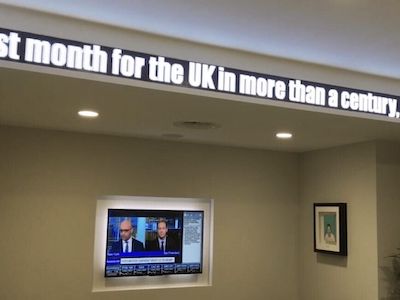
Technical Specifications
LED ticker specification starts with the physical viewing condition, not the content idea. A ticker above a retail concession, read from three to six metres away, has a different pitch, brightness and cabinet requirement from an exterior ticker on a transport hub concourse or a live market display on a financial-services trading floor. The figures below are typical working ranges used for specification discussion; final values should be confirmed against the chosen module, controller and enclosure data sheet.
The table below maps ticker use cases to Dynamo's actual product families. Each row lists the series, the module size, the pixel pitches available within that series and the per-module resolution. Total ticker resolution is the per-module resolution multiplied by the number of modules along the length and height of the run. Values are taken from Dynamo's published module specifications — the LED display calculator can be used to convert chosen module dimensions into a full ticker resolution and aspect-ratio plan.
| Use case |
Dynamo series |
Module size |
Available pitches |
Per-module resolution |
Notes |
| Indoor ticker — financial trading floor, retail, lobby |
DX / DX HB |
250 × 250 mm |
DX P1.9, P2.5, P2.6, P2.9, P3.1, P3.9, P5.9; DX HB P2.9, P3.9 |
128 × 128 px (P1.9) down to 42 × 42 px (P5.9) per module |
Standard indoor format; pick the pitch from the closest expected viewing distance |
| Premium fine-pitch indoor ticker — boardroom, broadcast studio set, executive lobby |
DYF / DFC |
300 × 337.5 mm (DYF) or 304 × 342 mm (DFC) |
DYF P0.93, P1.25; DFC P1.58, P1.9 |
DYF 320 × 360 px (P0.93) and 240 × 270 px (P1.25); DFC 192 × 216 px (P1.58) and 160 × 180 px (P1.9) per module |
Flip-chip COB; 600 × 337.5 mm (DYF) and 608 × 342 mm (DFC) cabinets give 16:9 proportions; suitable where the ticker doubles as a fine-pitch information surface |
| Outdoor ticker — building façade, transport concourse, kerb-side signage |
DVO |
480 × 240 mm |
P6, P8, P16 |
80 × 40 px (P6), 60 × 30 px (P8), 30 × 15 px (P16) per module |
Outdoor format; IP65 front and rated above 6,000 nits on the datasheet; specify brightness in line with the installation context |
| Outdoor or XR fine-pitch ticker — flagship retail exterior, broadcast plate |
DRX (500 mm platform) |
250 × 250 mm (four modules per 500 × 500 mm cabinet) |
P0.976, P1.25, P1.56, P1.95, P2.6, P2.97, P3.9 |
256 × 256 px (P0.976) down to 64 × 64 px (P3.9) per module |
Indoor and outdoor variants; outdoor versions rated above 3,000 nits with an IP65 front; use where fine pitch is required outdoors |
| Rental / exhibition ticker — short-term events, touring (e.g. the HFMA Annual Conference LED video wall rental) |
DRE (496 mm platform) |
248 × 248 mm (four modules per 496 × 496 mm cabinet) |
P1.55, P1.93, P2.58 (indoor); P1.55, P1.93, P2.58, P2.95, P3.875 (outdoor) |
160 × 160 px (P1.55) down to 64 × 64 px (P3.875) per module |
Exhibition and rental series (indoor IP40, outdoor IP65 front); usable as a temporary ticker tape on stand structures |
Common to all Dynamo tickers: HDMI input to receiver from sending card and media player; control over TCP/IP, RS485, WiFi or 4G; magnet-backed or screw-fix module mounting depending on series; cabinet finishes in wood, brushed metal, powder-coated steel or custom paint as agreed at specification stage. Service life is typically quoted as 80,000-100,000 hours at half brightness for the LED package, subject to drive current and operating temperature.
Pitch should be selected from the closest normal viewing distance. A working rule of thumb is that a pitch of N millimetres becomes comfortably legible at a viewing distance of around N metres — so P1.9 from around 2 m, P2.6 from around 2.6 m, P3.9 from around 4 m and so on. That rule is not a substitute for a content mock-up, because ticker legibility also depends on character height, scroll speed, font weight, contrast and viewing angle.
Ambient light drives brightness. A DVO P8 outdoor ticker can be the right answer for a bright kerb-side installation, but it will look coarse in a close-view retail interior. Conversely, a DX P1.9 indoor ticker will not have the output, sealing or thermal margin needed for direct sunlight and rain — that environment calls for DRX or DVO instead. For broadcast studios and filmed retail activations, refresh rate and grey scale should be treated as formal requirements, not optional extras.
Indoor And Outdoor Design
Brightness, Glare And Contrast
Indoor LED tickers usually sit in controlled light and are commonly specified at 800-1,500 cd/m2. That range keeps text readable without causing glare for staff, shoppers or visitors standing close to the display. Outdoor tickers need a different design target. In daylight, and especially where direct sun reaches the face of the display, 5,000 cd/m2 or more is normally required to maintain contrast.
The same content should not simply be copied between indoor and outdoor tickers. Outdoor content authored for full brightness can appear harsh or washed out indoors. Indoor content may look underpowered outside, especially if the colour palette relies on low-contrast greys or thin type.
Ingress Protection And Housing
Indoor tickers are commonly IP30, which is suitable for dust protection in a dry environment but not for water exposure. Outdoor tickers should normally be specified with an IP65 front face where direct rain is expected. Rear and side ratings may be lower, often because cable entry, power connectors and access ports dictate the practical sealing level.
Sealing affects thermal design. An IP65 housing protects the electronics, but it also traps heat. Outdoor tickers exposed to sun need either active cooling, such as filtered fans, or a passive heat-spreader chassis with enough margin for peak summer conditions. The cooling strategy should be agreed before the enclosure is fabricated, because retrofitting ventilation can compromise the IP rating.
Access, Power And Cabling
Outdoor tickers are often front-serviceable, allowing modules and power supplies to be replaced without access behind the wall or fascia. Indoor installations can sometimes use rear access from a joinery cavity, lift lobby wall or ceiling void, which may simplify the front finish.
Outdoor units draw more current and should usually have a dedicated supply circuit. Indoor tickers may share a ring circuit if the electrical load calculation allows it. Exposed outdoor cabling should use UV-resistant conduit, suitable glands and IP-rated connectors. Indoors, Cat6, HDMI and local power distribution are usually simpler, provided cable lengths and controller limits are respected.
Viewing Angle And Character Size
Outdoor ticker viewing is often from a pedestrian pavement or concourse, so horizontal viewing angle matters. Indoor retail and workplace tickers may be above head height, which makes vertical viewing angle more important. Character height should follow the environment: outdoor text often needs 8-12 pixel character height or more for distance readability, while indoor displays can use 6-8 pixel characters where viewers are closer.
Live Data Integration
A live LED ticker is a display endpoint, not the full data system. For financial-services, transport, retail operations or broadcast use, the system normally includes the data source, middleware, media player, LED sending hardware, receiver cards and a monitoring process. Each layer affects latency, uptime and content accuracy.
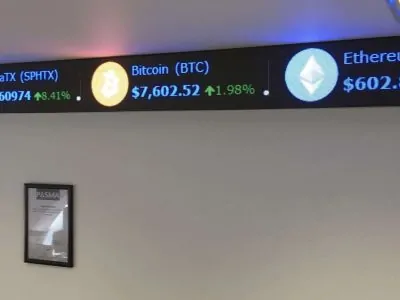
Financial market data may come from Bloomberg API, Reuters Eikon, Refinitiv, IEX Cloud or a custom broker REST feed, depending on the licence and data rights already held by the organisation. Cryptocurrency tickers may use CoinGecko, Binance or Coinbase WebSocket feeds. Latency requirements vary sharply. A trading floor may ask for sub-500 ms updates, while a reception ticker, brand experience wall or visitor-facing market display may be acceptable at 5-10 second polling intervals.
Between the source and the screen, a ticker controller service usually polls or subscribes to the feed, validates the payload, formats the values and pushes them to the display system. The intermediate format may be CSV, JSON, XML or a proprietary RS232 protocol, depending on the controller and media player. This middleware layer is also where symbol lists, rounding, currency formatting, fallback text and brand colour rules should be handled.
On the display side, TCP/IP socket push is usually the most flexible option for modern installations. RS485 multi-drop remains relevant for legacy financial tickers and long serial runs. WiFi can work for low-risk content where occasional delay is acceptable, but it should not be the default for time-sensitive financial or transport information. 4G or cellular control is useful where on-premise networking is unavailable, such as temporary exhibition stands or landlord-controlled public areas.
A single physical ticker can be split into multiple content zones. For example, a left zone may show index values, a centre zone may show currency pairs and a right zone may show news headlines. This should be authored at CMS or middleware level so operators can change zone widths, feeds and priorities without rebuilding the physical display configuration.
Critical installations should include redundancy from the start. That may mean dual media players in active and standby configuration, separate data-feed sources, dual network paths and locally cached fallback content. A common financial specification is primary market feed plus secondary market feed, with cached last-known values or an approved holding message if both feeds fail.
The latency budget is the sum of source polling or push, middleware processing, network delivery, media-player rendering and display refresh. For non-trading-floor use, 300-1,500 ms end to end is a practical range. Lower latency is possible, but cost rises as the system moves towards dedicated feed handling, tighter monitoring and more formal service-level commitments. For financial floors, 99.9% uptime or better should be agreed in contract terms, including maintenance windows, spare modules and response times.
Content Management
The content workflow should be specified with the same care as the LED hardware. A ticker that is difficult to update will either be left unchanged or passed around informally, which increases the risk of stale content, spelling errors and inconsistent brand use.
Cloud CMS platforms, including Dynamo's own cloud CMS, are useful where operators need remote access, multi-site publishing and central reporting. They normally require an ongoing licence and a network path to the player. Local LAN-only control software can suit a single-site installation where remote publishing is not needed. The trade-off is that updates normally require local access or a VPN-style arrangement.
Scheduling should cover more than simple playlists. Day-parting allows different content in the morning, lunchtime and evening. Event-driven rules can trigger a promotion when a data value changes, a stock level is reached or a match score updates. Countdowns are useful for product launches, sale periods, transport departure information and live event timings.
For multi-site retail or workplace estates, the CMS should support fleet-wide publishing by location group. A central brand team may publish national content, while local teams can add site-specific messages within approved templates. Larger organisations often need an editor, approver and publisher workflow so a draft is checked before it reaches a public-facing ticker network.
Media players should cache content locally. If the network drops, the ticker should keep playing the last approved schedule rather than showing a blank screen or an unhelpful offline warning. Logging also matters: regulated sectors often need an audit trail showing who changed content, when it changed and which displays received it.
A good operator workflow includes a managed asset library, locked brand colours, approved fonts, reusable animation templates and a virtual preview of the ticker canvas. Preview is especially important for narrow-format displays because text that looks fine in a normal 16:9 CMS window may fail once constrained to a long, shallow LED strip.
Comparison With Alternatives
LED Ticker Vs LCD Scrolling Marquee
Long-format LCD ribbons can offer higher pixel density at close viewing distances, which is useful for small text, fine graphics or touchscreen applications. The trade-off is weight, fragility, lower typical brightness and more sensitivity to temperature. LED tickers are usually better for outdoor visibility, ruggedness, long viewing distances and irregular architectural lengths.
LED Ticker Vs E-Ink Or E-Paper
E-ink is low-power and readable in sunlight without a backlight, which makes it useful for certain transit and information signs. It is not a strong fit for animated ticker content. Refresh is slow compared with LED, colour capability is limited at relevant price points, and fast-changing data can feel delayed.
LED Ticker Vs Projected Text
Projection can place moving text across an architectural surface without building a physical strip into the wall. It needs darkness, a controlled projection surface and regular alignment checks. Lamp or laser engine life also needs planning. For 24/7 operation in bright public areas, an LED ticker is normally more predictable.
LED Ticker Vs Segmented LED Dot Matrix
Older bus, rail and industrial dot-matrix signs can be inexpensive and visually direct, but they are usually limited to low pixel density, single-line text and restricted colour. A modern LED ticker provides the same narrow-format language with finer pitch options, full-colour content and better CMS integration.
LED Ticker Vs Tablet Or App-Based Signage
A tablet fixed to a wall is cheap for a prototype, but it is consumer-grade hardware. Brightness, lifespan, mounting, thermal behaviour and brand control are limited. For a commercial space where the display is part of the interior, facade or operational information system, a purpose-built LED ticker is the more durable route.
LED ticker FAQs: pitch, brightness, price, installation and warranty
- What pixel pitch does an LED ticker need?
- Work from the closest normal viewing distance: a pitch of N millimetres reads comfortably from about N metres. DFC Series at 1.5 mm or 1.9 mm suits desks and receptions viewed up close, DX Series at 1.9 mm to 5.9 mm covers most indoor runs, and DVO Series at 6 mm to 16 mm is for outdoor use. Legibility also depends on character height and scroll speed, so we mock up your content at the real pitch and module count before manufacture. See the LED pixel pitch guide.
- How bright does an LED ticker need to be in a shop window?
- Brighter than a standard indoor panel. Indoor DX Series is rated at about 800 nits, which is fine in a lobby but washes out behind glass in daylight. DX HB high-brightness panels are rated at 3,000 nits or more on the datasheet, and DX HB2.6 at 3,500 nits. Outdoor DVO Series runs at 6,000 to 8,000 nits. Where the glass must stay clear, transparent LED film mounts on the inside of the glazing. See also LED displays for bookmakers.
- How much does an LED ticker cost?
- Tickers are quoted per project because run length, height and the number of corners vary. Our 2026 quote medians for LED panels are £6,580 per m² for fine pitch (1.5 to 1.9 mm), £4,540 for mid pitch (2.5 to 2.6 mm) and £3,680 for coarse pitch (3.9 to 6.25 mm), ex VAT. UK installation is £150 per m² with a £1,000 minimum, de-rig included, and event hire runs at a median £520 per m². Full table: how much an LED display costs.
- Who installs the ticker, and how long does it take?
- Dynamo's own engineers do the whole job: site survey, structural design, cable routes, installation and commissioning, including curved runs, 90-degree corners and window mounts. DX cabinets are 47 mm deep and front-serviceable, so modules can be replaced from the front. Lead time depends on run length, cabinet fabrication and site access, and is confirmed in writing on the quotation. See LED screen installation services.
- What warranty comes with a Dynamo LED ticker?
- Every Dynamo LED ticker carries a 3-year return-to-base warranty as standard. Optional full-service contracts with 24 to 48 hour response options are available on request. Front-serviceable modules keep repairs quick, and remote monitoring can flag a fault before staff notice it. Warranty terms are set out on the quotation; company facts are on our about us page.
- How does live financial data get onto the ticker?
- Two routes. Dynamo's own financial ticker software runs on a Windows PC, takes market data and RSS news feeds, maps one continuous feed across folded or multi-section runs and uses outbound-only network connections, so nothing needs an inbound port through your firewall. Alternatively your own middleware pushes formatted data to the display over TCP/IP or RS485. Both PIMCO and Alpha FX run live prices, rates and news on Dynamo tickers.
- Can an LED ticker be curved or turn corners?
- Yes. Rigid cabinets turn 90-degree corners with no visible gap, as on the 77 metre Bob Bob Cité run, and DX Series cabinets are designed for right-angle joins. Flexible LED modules follow curves, as on the 35 metre China Mobile ribbon and the 24 metre S-shaped ticker at Glasgow University. Radius and access are checked at the site survey before we confirm the module type.
LED ticker basics: common questions
- What is a LED ticker?
- An LED ticker is a long, narrow LED display that scrolls text and numbers, typically share prices, news headlines, sports scores or brand messages, across a single horizontal strip. Dynamo designs and builds custom LED tickers for trading floors, corporate lobbies, retail windows and broadcast studios, from short window ribbons to the 80 metre PIMCO trading-floor run.
- What is a ticker tape used for?
- Ticker tape originally printed share prices on paper strips for trading floors. A modern LED ticker does the same job digitally: live share prices, currency rates, news headlines and corporate messages, in full colour, on a schedule, and linked to a content management system. Dynamo has installed LED tickers for Alpha FX, PIMCO and Bob Bob Cité.
- Do ticker tape machines still work?
- Mechanical paper-tape ticker machines were retired in the 1960s. Today the word ticker means the LED version: a scrolling text and data display that does the same job with live data feeds, full-colour graphics and far more flexible content. Dynamo specialises in modern LED ticker installations for commercial and retail use.
- Why is it called ticker tape?
- The name comes from the 19th-century telegraph ticker, which printed share prices on a paper tape with a distinctive ticking sound. The ticker tape parade tradition, showering streets with discarded tape, followed. Modern LED tickers keep the name and the job, scrolling live data, but replace the paper with custom LED hardware.